
Squarespace is usually the better choice for a fast, polished website with minimal maintenance. Self-hosted WordPress.org is usually better for publishers, stores, and businesses that need deeper control over content, SEO, and integrations.
The decision behind squarespace vs wordpress is really about ease of use versus control. For a polished portfolio or a small service website, Squarespace can get you online quickly with very little technical work; for a publishing business, custom directory, or growing store, WordPress.org usually offers more room to adapt.
This comparison looks at the differences that affect real decisions: platform architecture, pricing, onboarding, design, content publishing, ecommerce, SEO, security, portability, and long-term growth.
Quick Comparison: Squarespace vs. WordPress at a Glance
Quick Verdict: The choice between Squarespace and WordPress comes down to simplicity versus control. Squarespace is a hosted builder for non-technical users who want design without maintenance. WordPress.org is a self-hosted CMS for owners who need data ownership, advanced SEO control, and scalable publishing.
Squarespace is a hosted website builder. Its editor, hosting, security layer, templates, and support come from one provider. WordPress.org is free open-source software that you install on a hosting account and extend with themes and plugins.
That makes this a website builder versus CMS decision. Squarespace limits some choices so the day-to-day experience stays simple. WordPress gives you more choices and more responsibility, but you can change the hosting stack, content model, design system, and functionality as your needs develop.
| Criterion | Squarespace | WordPress.org |
|---|---|---|
| Platform type | Hosted website builder | Self-hosted open-source CMS |
| Best fit | Portfolios, brochure sites, small service businesses | Publishers, stores, custom business websites |
| Initial setup | Usually faster | More setup decisions |
| Hosting | Included | Purchased separately |
| Design approach | Curated templates and visual controls | Themes, blocks, builders, and custom code |
| Content scalability | Good for standard pages and blogs | Strong for complex publishing structures |
| SEO ceiling | Solid built-in essentials | Extensive technical control |
| Maintenance | Mostly handled by the provider | Managed by you or your host |
| Data portability | Basic export with platform limits | Full files and database access |
| Ecommerce fees | Basic may include a 2% fee; Core and Advanced show 0% | No WooCommerce platform commission |
According to W3Techs’ CMS market data, WordPress powers about 40.7% of all websites while Squarespace powers about 2.5%. Those figures do not make WordPress the right choice for everyone, but they help explain its larger ecosystem of themes, developers, plugins, hosting providers, and documentation.
The Fundamental Architectural Divide: SaaS vs. Open-Source
With Squarespace, you rent access to a managed service. Squarespace operates the infrastructure and decides which platform features, export options, and integrations are available. You do not need to maintain PHP, patch a CMS, or test plugin compatibility. See what WordPress is for the contrasting open-source model.
With WordPress.org, you install the software on a host you choose. The core software is free under the GPLv2 license. You own the site files and database, but you also need a plan for updates, backups, security, and performance.
That arrangement is what self-hosted WordPress means in practice: you choose the host, retain access to your files and database, and decide which themes and plugins run the site, while taking responsibility for updates, backups, security, and recovery. Our guide explains the architecture, setup paths, true costs, and situations where self-hosting makes sense.
The practical difference is not “easy versus impossible.” Modern WordPress themes and block editing are much friendlier than older WordPress workflows. The difference is that Squarespace makes most infrastructure decisions for you, while WordPress lets you make them yourself.
Who Truly Wins Each Category: Summary Scorecard
- Ease of first setup: Squarespace
- Design polish without configuration: Squarespace
- Advanced customization: WordPress
- High-volume publishing: WordPress
- Technical SEO control: WordPress
- Hands-off maintenance: Squarespace
- Long-term portability: WordPress
- Simple small-store setup: Squarespace
- Complex ecommerce and integrations: WordPress with WooCommerce
The Critical Misconception: WordPress.org vs. WordPress.com vs. Squarespace
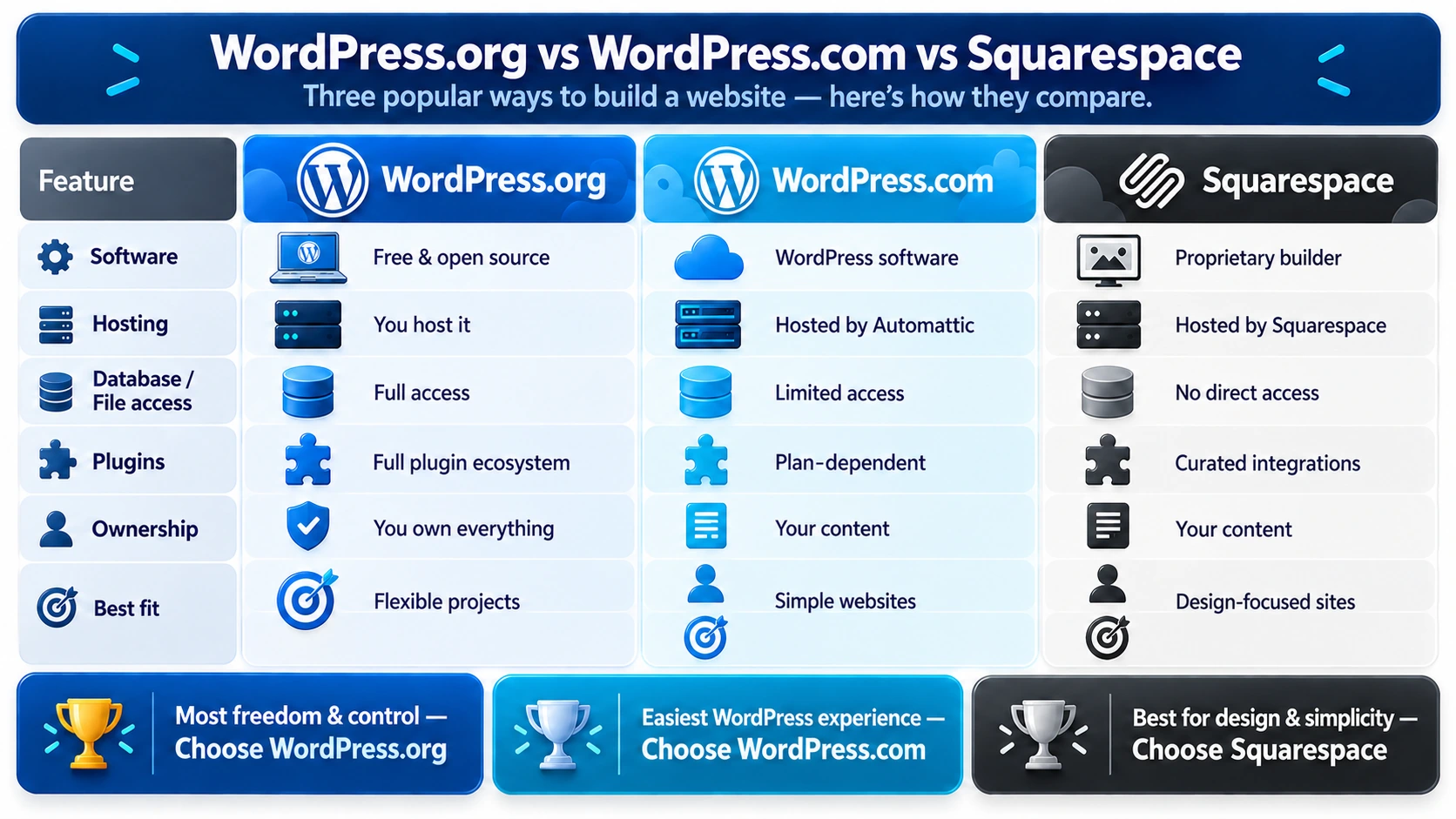
Many comparisons use “WordPress” to mean WordPress.com. That creates confusion because WordPress.org and WordPress.com are not the same service.
| Product | What it provides | Hosting | Plugin access |
|---|---|---|---|
| WordPress.org | Free CMS software | You choose the host | Broad control over installation |
| WordPress.com | Commercial hosted WordPress service | WordPress.com | Depends on the subscription tier |
| Squarespace | Commercial hosted website builder | Squarespace | Curated features and integrations |
The WordPress.com pricing page lists plans from approximately $4 to $45 per month when billed annually. Monthly billing has separate, usually higher rates, and custom plugin installation is associated with higher plans. A comparison with self-hosted WordPress.org must not treat those prices as the cost of WordPress software itself. The related WordPress.com versus WordPress.org guide explains the distinction in more detail.
The Two WordPresses Explained (And Why It Changes the Comparison)
Self-hosted WordPress means you arrange the domain, hosting, installation, theme, plugins, backups, and maintenance. Many hosts offer one-click installation, managed updates, staging environments, and automated backups. You can also move the site to another provider if the host no longer fits your needs.
The trade-off is responsibility. A plugin conflict, expired license, weak password, or neglected backup can become your problem. Good hosting and a simple maintenance routine reduce that risk.
Scoping This Guide: Why Self-Hosted WordPress.org Is the True Competitor
WordPress.com bundles hosting with the WordPress publishing experience. That is convenient, especially for users who want WordPress features without choosing a separate host. The trade-off is that features such as plugins, themes, storage, and ecommerce tools depend on the plan.
For the rest of this article, WordPress means self-hosted WordPress.org unless the section specifically mentions WordPress.com.
Pricing and Total Cost of Ownership (TCO): The 3-Year Reality
The cheapest advertised price is rarely the complete website budget. Squarespace bundles more services into its subscription. WordPress separates the costs, which can make the entry price lower but the decision more involved.
Squarespace Pricing Tiers, Hidden Fees & Renewal Hikes
The pricing view checked for this article lists three current Squarespace plans: Basic at $12 per month, Core at $17 per month, and Advanced at $25 per month. Squarespace pricing can vary by region and billing basis, so confirm whether the displayed amount is a monthly charge or an annual-billing monthly equivalent before comparing totals.
When a price is advertised as a monthly amount while billed annually, that is a monthly equivalent, not necessarily a month-to-month charge. Compare the billing periods clearly:
| Squarespace plan | Displayed monthly price | Simple 12-month total |
|---|---|---|
| Basic | $12 | $144 |
| Core | $17 | $204 |
| Advanced | $25 | $300 |
Squarespace may include a custom domain for the first year, but its pricing documentation notes that renewal charges commonly apply later. A common planning range is about $20–$30 per year depending on the domain and registrar. Business email, premium services, and integrations can add recurring costs. Ecommerce users also need to examine plan-specific transaction fees, not just the subscription price.
WordPress True Setup Costs: Hosting, Domains, Themes & Plugins
A realistic self-hosted WordPress budget includes:
- Domain registration: GoDaddy’s published .com example shows a promotional first-year price of $0.01 when the domain is purchased with a three-year registration; its listed renewal price is $22.99 plus a $0.20 ICANN fee. For budgeting, use the renewal price rather than the introductory promotion. GoDaddy domain pricing
- Hosting: Hostinger’s current managed WordPress page lists Premium at $2.99 per month on a 48-month term ($143.52 paid upfront), renewing at $10.99 per month. Its Unlimited plan is $3.99 per month on the same term ($191.52 upfront), renewing at $16.99 per month. That equals approximately $35.88–$47.88 per year during the introductory term, or $131.88–$203.88 per year at renewal. Hostinger managed WordPress hosting
- A theme, which may cost nothing or about $59 for a premium license.
- Plugins, many of which are free, while specialized tools can cost $100 to $200 per year.
- Backups, security, maintenance, or professional help when you do not want to handle those tasks yourself.
These figures are planning estimates rather than universal WordPress prices; the final cost depends on the host, license terms, site complexity, billing term, and how much work the owner handles. Promotional hosting prices usually require a multi-year prepayment and should not be confused with renewal pricing.
If you outsource WordPress work, Fiverr’s published 2026 guidance places common website-maintenance work at about $50–$100 per hour, while its WordPress developer guidance places website building and development at about $50–$250 per hour. Individual Fiverr listings may be lower or higher depending on the seller, location, scope, and expertise, so treat these as budgeting ranges rather than guaranteed hourly rates. Fiverr website maintenance costs · Fiverr WordPress developer costs
For a practical host comparison, see the best hosting for WordPress.
The real costs of a WordPress site depend on how much of the work you do yourself and how much support you buy. WordPress is not a free website in the literal sense, but the core software does not require a platform subscription.
The 3-Year Cumulative Cost Comparison (Low, Mid & Scale Scenarios)
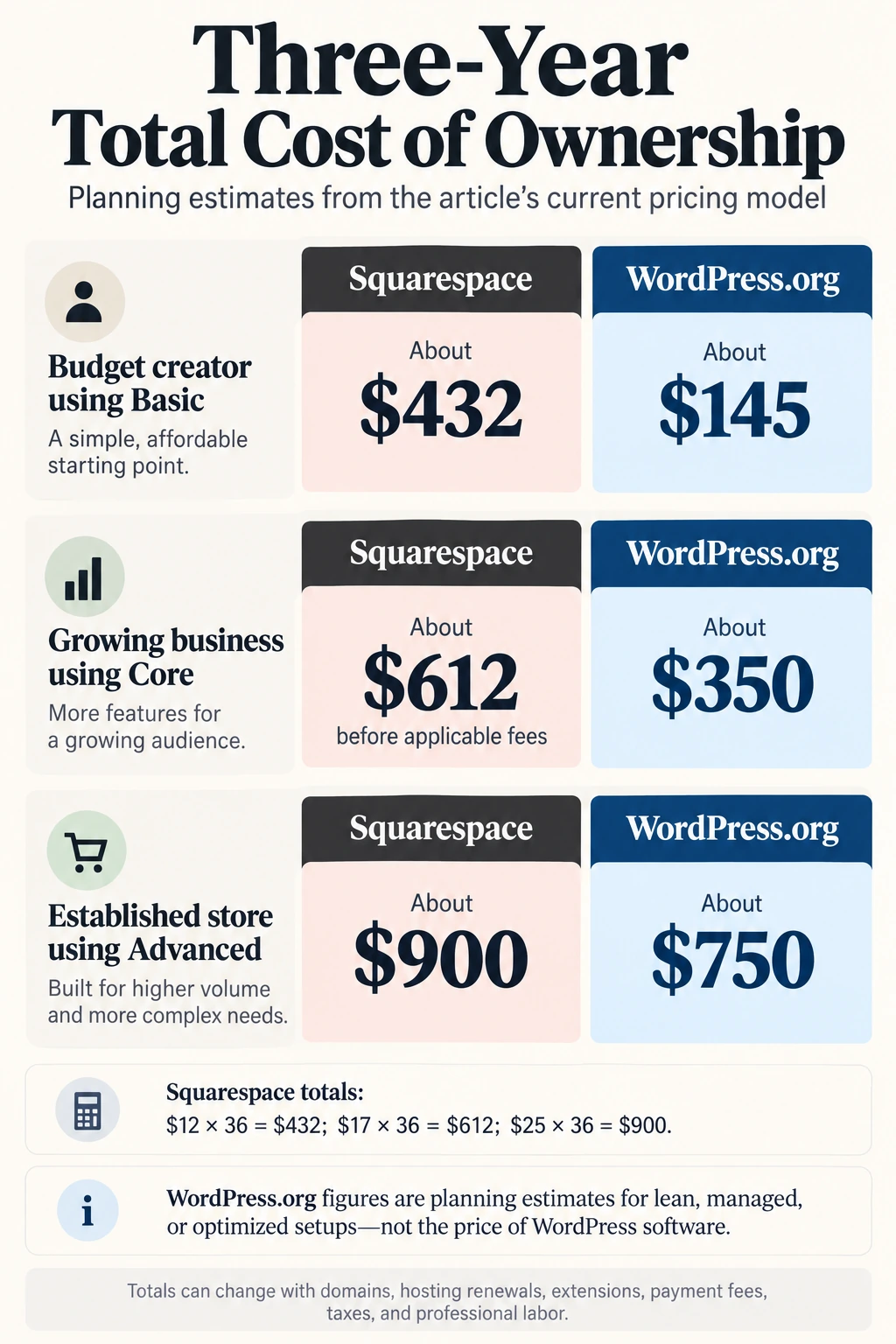
The following figures are planning estimates, not quotes. The Squarespace figures use a simple 36-month calculation from the displayed Basic, Core, and Advanced monthly prices: $12 × 36 = $432, $17 × 36 = $612, and $25 × 36 = $900. Hosting promotions, taxes, domains, plugin licenses, and professional labor can change the totals. The WordPress ranges model a lean self-managed or managed setup; they are not subscription prices for WordPress.org software.
| Scenario | Squarespace over three years | WordPress.org over three years | What the comparison shows |
|---|---|---|---|
| Budget creator using Basic | About $432 | About $145 for a lean setup | WordPress can cost less if setup is self-managed |
| Growing business using Core | About $612 before applicable fees | About $350 for mid-tier managed hosting | WordPress provides more control as requirements grow |
| Established store using Advanced | About $900 | About $750 for an optimized WooCommerce setup | Fee structure and extensions become more important |
Squarespace is easier to budget. WordPress can be less expensive over time, but only when the owner chooses suitable hosting and avoids unnecessary premium tools. The right question is not “Which one is free?” It is “Which operating model fits the work I am willing to do?”
Ease of Use, Onboarding & The Learning Curve
Squarespace is usually faster for a first launch. You can choose a template, edit the copy, arrange sections, connect a domain, and publish without learning a hosting dashboard.
Squarespace’s Guided Onboarding and Fluid Engine Visual Builder
Squarespace Fluid Engine uses a visual grid for placing blocks on a page. Spacing controls, responsive behavior, templates, and mobile arrangements are handled inside the same editor. That makes it appealing to a photographer, consultant, or local business owner who wants to focus on presentation rather than infrastructure.
The limits appear when the site needs unusual layouts, custom database behavior, or an application-like workflow. The editor is designed to keep ordinary sites manageable, not to expose every layer of the platform.
The WordPress Setup Journey: From Host Installation to the Block Editor
A modern WordPress setup usually looks like this:
1. Buy a domain and hosting plan. 2. Use the host’s one-click WordPress installer. 3. Enable HTTPS and configure permalinks. 4. Select a Block Theme and establish global styles. 5. Build pages with Gutenberg blocks and block patterns. 6. Add only the plugins the site actually needs.
The step-by-step WordPress installation guide can help new users through the setup. Standard builds do not require coding, but they do require more decisions. That is the real learning curve.
Design Capabilities, Templates & Customization Freedom
Squarespace is strongest when you want a coherent design quickly. WordPress is strongest when the design must follow unusual rules or support content types that a standard template does not anticipate.
Squarespace Templates: Curated Aesthetic Perfection within Guardrails
Squarespace templates are curated around typography, spacing, photography, portfolios, service pages, and common business layouts. The guardrails make it difficult to create a visually chaotic page by accident. For many small sites, that is a feature.
The same guardrails can become frustrating if you want a highly unconventional layout. Version 7.1 uses global styling and Fluid Engine controls, but switching the entire design direction is not the same as replacing a theme in WordPress.
WordPress Theming & Block Patterns: Limitless Customization
WordPress themes, block patterns, page builders, custom CSS, and PHP templates give designers a much larger range of options. Block Themes and Full Site Editing allow users to edit headers, footers, templates, and global styles without writing code.
Themes such as Astra and GeneratePress provide useful starting points. Developers can add custom post types, child themes, and bespoke templates when a site needs a more specialized structure. Use the secure, high-performance WordPress theme checklist before choosing a theme.
Blogging and Content Management
This is one of the most important differences for publishers. Squarespace can support a normal blog with categories, tags, images, and editorial pages. That is enough for many consultants and creators.
WordPress becomes more valuable when the publication grows. Custom post types can separate reviews, locations, authors, courses, products, or case studies. Taxonomies can create deeper navigation, and plugins can support editorial workflows, memberships, newsletters, and structured content.
That flexibility adds maintenance. A publisher should choose a theme and plugin set carefully, maintain backups, and avoid adding tools that duplicate one another. If the site is intended to become a content business rather than a simple blog, WordPress usually provides the stronger foundation.
Imagine a travel site that begins with ten destination guides and later adds hotel comparisons, author pages, email courses, and a members-only section. Squarespace can support the early version, but WordPress gives the owner more ways to model and connect those different kinds of content without rebuilding the site around a new platform.
WordPress vs Squarespace Ecommerce: WooCommerce vs. Squarespace Commerce
Squarespace Commerce: Built-In Simplicity and the Basic-Plan Transaction Fee
Squarespace Commerce is convenient for a small catalogue, a handful of digital products, service packages, or appointment-based sales. WooCommerce is better suited to stores that need unusual checkout logic, complex variants, subscriptions, or many integrations.
| Ecommerce capability | Squarespace Commerce | WooCommerce on WordPress |
|---|---|---|
| Platform transaction fee | Basic may include a 2% fee; Core and Advanced show 0% | 0% platform commission |
| Product catalogue | Good for small and medium catalogues | Strong for large and complex catalogues |
| Checkout | Integrated, with platform limits | Extensible through plugins and code |
| Subscriptions | Available through supported tools | Broad extension ecosystem |
| Tax and shipping | Integrated options | Configurable through extensions |
| Maintenance | Mostly managed | Owner or host manages updates and backups |
At $800 in monthly sales, a 2% Basic-plan platform fee equals $16. Add the Squarespace Basic plan at $12 per month and the platform total reaches about $28 before payment processing. A store owner should compare that total with Core at $17, Advanced at $25, and WooCommerce rather than looking only at the subscription price.
WooCommerce on WordPress: Enterprise-Grade Power with Zero Platform Tax
Payment processing is separate from platform fees. Stripe’s pricing lists a common US card rate of 2.9% plus $0.30 per successful transaction. WooCommerce does not add a platform commission, but hosting, extensions, gateways, tax services, fulfillment, and maintenance still cost money.
WooCommerce supports large catalogues, product variants, customer accounts, subscriptions, multi-currency processing, custom checkout funnels, and dropshipping integrations. It is more extensible than Squarespace Commerce, but the owner must budget for hosting optimization, extensions, backups, and updates.
SEO, Site Speed & Performance: Winning Organic Search
Squarespace SEO: Solid Turnkey Essentials with Technical Ceilings
Squarespace provides the essentials most small websites need: clean URLs, SSL, headings, metadata fields, sitemaps, and a managed hosting environment. A local business can publish useful pages and rank without touching server configuration.
WordPress Technical SEO: Granular Control, Advanced Schema & Core Web Vitals
WordPress has the higher technical ceiling. Site owners can use SEO tools such as Yoast SEO or Rank Math, manage redirects, customize schema, edit robots rules, and select caching and image optimization tools.
That advantage comes with a warning. A poorly configured WordPress site with too many plugins and weak hosting can be slower than Squarespace. The platform gives you control; it does not make good decisions for you.
| SEO capability | Squarespace | WordPress.org |
|---|---|---|
| SSL and basic URLs | Managed | Host and configuration dependent |
| XML sitemap | Automatic | Core, plugin, or custom configuration |
| Metadata | Built-in fields | Deep control through plugins or code |
| Schema | More limited customization | Extensive JSON-LD options |
| Robots rules | Restricted | Editable |
| Redirects | Supported with limits | Plugin, server, or programmatic control |
| Caching | Platform-managed | Host, CDN, or caching plugin |
The relevant performance targets are Google’s Core Web Vitals: LCP below 2.5 seconds, CLS below 0.1, and INP below 200 milliseconds. A focused WordPress site-speed optimization workflow can improve performance, but content quality and search intent still matter.
Security, Backups & Maintenance: Hands-Off Peace of Mind vs. Self-Reliance
Squarespace removes most platform maintenance from the owner’s workload. WordPress requires more attention, but the risk is manageable when the site has reputable hosting, current software, strong credentials, backups, and a small plugin footprint.
Squarespace’s Zero-Maintenance Advantage: Automatic Patches and DDoS Defense
Squarespace manages platform patches, infrastructure, certificates, and much of the security layer. You do not need to test every platform update against a collection of plugins. For a solo operator who wants to avoid technical work, this peace of mind may justify the subscription premium.
Demystifying WordPress Security: Practical Hardening and Automated Maintenance
A sensible WordPress security routine includes:
1. Reputable hosting with server-side firewalls and automated backups. 2. Automatic minor core updates and carefully managed plugin updates. 3. Strong passwords, two-factor authentication, and limited login attempts. 4. A CDN or WAF such as Cloudflare WAF.
Wordfence and Sucuri can provide additional scanning and firewall tools. Managed WordPress hosts can add staging, backups, PHP version management, and rollback options. Maintenance time varies with site complexity, so no single hourly or monthly figure applies to every WordPress site.
Owners who want WordPress flexibility without handling every operational task can outsource WordPress maintenance. A suitable provider should test updates on staging, maintain off-site backups, monitor security, and define how emergency troubleshooting is handled, because managed hosting alone may not include application-level care.
When something does go wrong, the response process matters as much as the platform. This WordPress bug fix guide explains how to use recovery evidence, isolate plugin or theme conflicts, protect a backup, and decide when to escalate instead of applying blind updates.
Data Ownership, Vendor Lock-In & Migration Flexibility
The “Walled Garden” Reality: Squarespace Content Portability Constraints
Squarespace lets you export some content, but the Squarespace Help Center explains that the export does not reproduce the whole platform. Custom CSS, Fluid Engine layouts, some media blocks, product variations, customer histories, and form submissions may require manual rebuilding.
Sovereign Ownership: Complete Portability and Database Freedom on WordPress
WordPress gives you the files and database. You can use host backups or tools such as Duplicator and All-in-One WP Migration to move between providers. With database access and SFTP, the hosting company is replaceable.
That does not make migration effortless. DNS, email, redirects, caching, media, and server configuration still need attention. The difference is that WordPress gives you the underlying materials needed to move the site instead of asking you to rebuild everything inside another platform.
If you later outgrow a host or need to change infrastructure, WordPress gives you a practical route forward, but the move still requires planning. Our moving WordPress guide covers file and database transfers, pre-launch testing, DNS cutover, redirects, and post-migration checks.
The Verdict: Which Platform Fits Your Specific Goals in 2026?
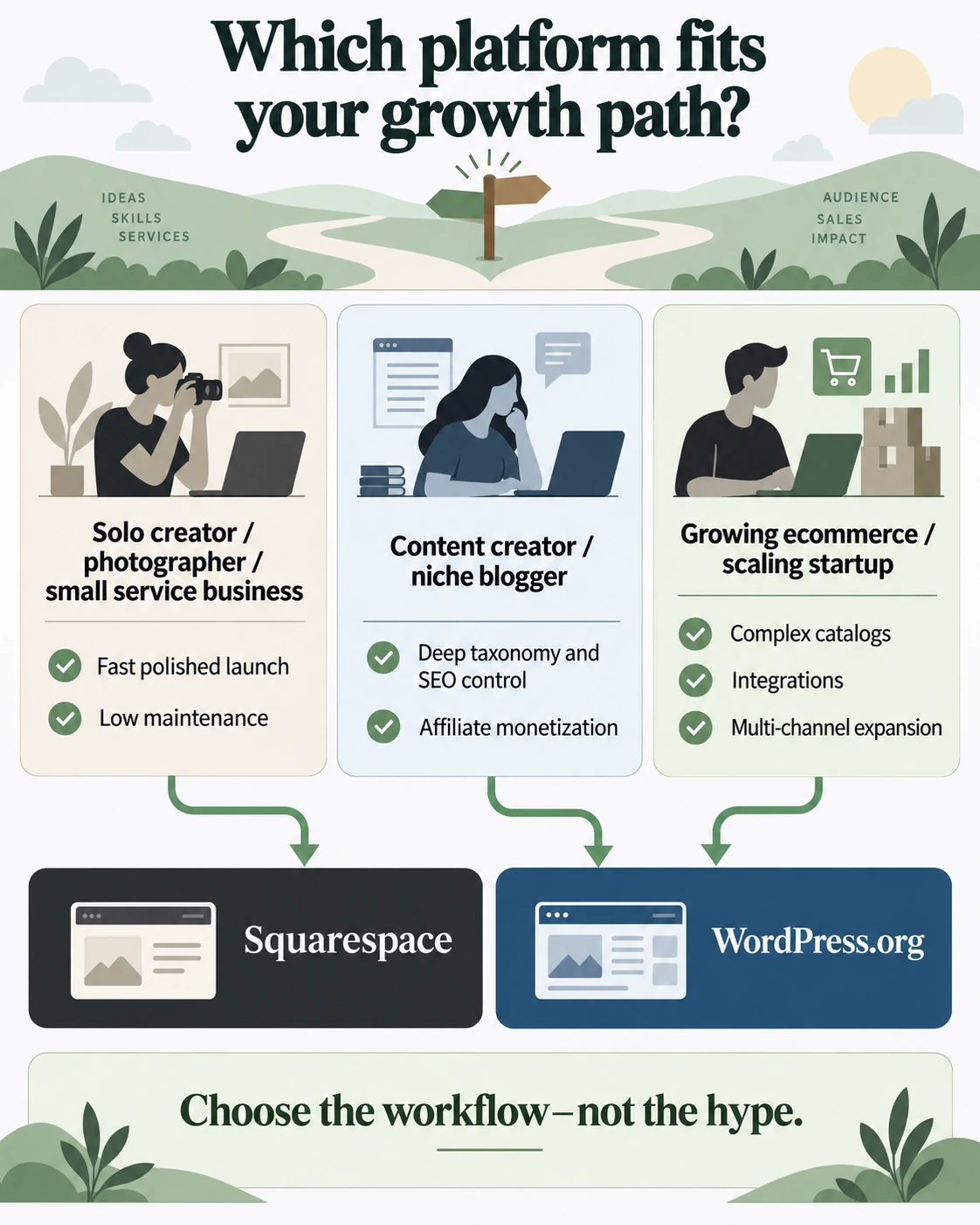
When You Should Choose Squarespace
Choose Squarespace if your priority is a professional presentation site with minimal technical work. It is a good fit for:
- Photographers, artists, and other visual creatives.
- Local service businesses that need a brochure site and contact forms.
- Event organizers working toward a short launch deadline.
- Solo operators who do not want to manage plugins, hosting, or updates.
When You Should Choose WordPress (WordPress.org)
Choose WordPress.org if the website is becoming a publishing system, store, or business platform. It is a good fit for:
- Bloggers and publishers building affiliate, advertising, or membership revenue.
- Ecommerce brands that need custom checkout flows or complex catalogues.
- Businesses requiring directories, bookings, memberships, or custom data.
- Founders who want control over their files, database, and hosting provider.
For businesses that need implementation help, the WordPress Development Page is the appropriate next resource.
The choice is not about which brand is universally better. Squarespace asks you to accept platform limits in exchange for convenience. WordPress asks you to accept more setup and maintenance in exchange for flexibility. Pick the cost you can live with for the next three years, not just the platform you can open fastest today.
Frequently Asked Questions (FAQ)
Which is better for SEO in a WordPress vs Squarespace comparison?
WordPress is stronger for advanced technical SEO because it gives site owners more control over schema, redirects, robots rules, caching, and content structures. Squarespace provides useful SEO essentials and may be the better practical choice when the owner will not maintain WordPress properly.
Can I migrate from Squarespace to WordPress later?
Yes, but expect a rebuild rather than a perfect one-click migration. Basic pages and blog posts may transfer through an XML export. Layouts, custom CSS, product variants, form data, and some customer records may require manual recreation.
Is Squarespace really easier for beginners than WordPress?
Yes, Squarespace is usually easier for an absolute beginner. Its hosting, templates, visual editor, and security layer are unified. WordPress has more setup decisions, although modern installers and Block Themes have reduced the learning curve.
Does Squarespace charge an ecommerce transaction fee?
The fee depends on the plan and pricing rollout shown in your region. In the current Basic, Core, and Advanced view used for this article, Basic may carry a 2% online-store transaction fee while Core and Advanced show 0%. Self-hosted WordPress with WooCommerce charges no platform transaction commission, although payment processors and other store services still charge their own fees.
Pricing and platform features change. Verify current terms before purchase.
Disclosure
This article contains no affiliate links. The publisher has no financial, commercial, employment, sponsorship, or other affiliation with Squarespace, WordPress, GoDaddy, Hostinger, Fiverr, or any other company or party mentioned. Links are provided for reference only.