
WordPress is free, open-source website software that helps you create, publish, and manage a website without coding every page from scratch. It is a content management system, or CMS, which means it gives you a dashboard where you can add pages, write blog posts, upload images, change your design, and manage your site content.
In plain English: WordPress gives you a place to build and run a website without needing to start from a blank screen of code.
People use WordPress for blogs, business websites, portfolios, news sites, online stores, membership sites, course platforms, and many other kinds of websites.
Before you choose it, though, there is one thing worth understanding early: WordPress.org and WordPress.com are related, but they are not the same thing. That small difference can affect your costs, control, hosting, and the amount of technical work you need to handle.
Table of Contents
- What Is WordPress?
- How WordPress Works
- What Is WordPress Used For?
- WordPress.org vs WordPress.com
- Is WordPress Free?
- Why Is WordPress So Popular?
- What Are Themes and Plugins?
- What Are the Downsides of WordPress?
- How WordPress Fits Into WordPress Development
- Should You Use WordPress?
- How to Get Started With WordPress
- FAQs About WordPress
- Final Thoughts
What Is WordPress?
WordPress is a website publishing platform. Instead of building every page manually with code, you use WordPress to create, organize, edit, and publish content through an admin dashboard.
The open-source WordPress project describes its mission as making publishing available to everyone. WordPress started in 2003, is built with PHP and a database, and is licensed as free software under the GPL. You can read the official project background on WordPress.org.
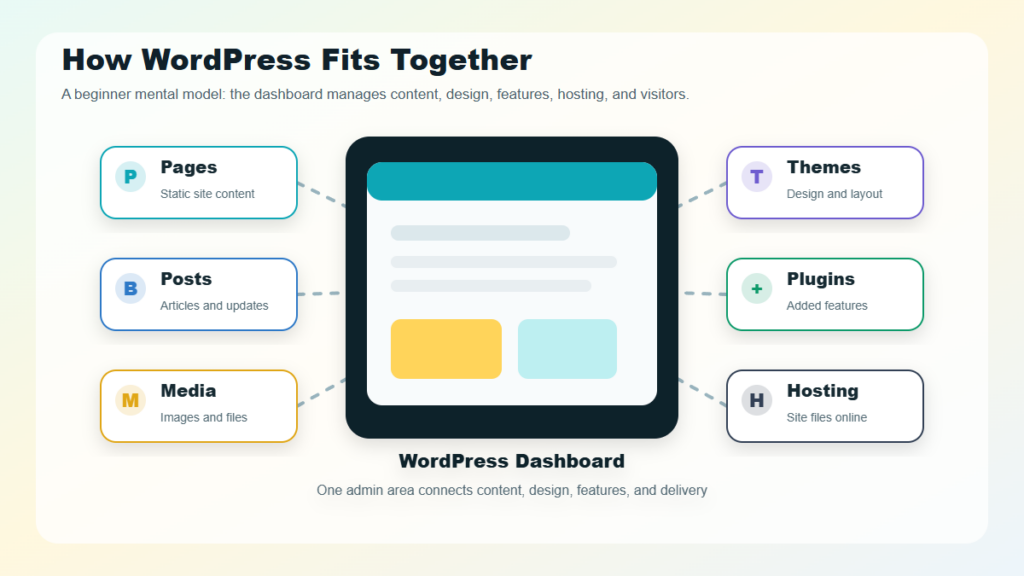
Once WordPress is installed, you can use it to:
- Create pages, such as Home, About, Services, and Contact.
- Publish blog posts and organize them by category or tag.
- Upload images, videos, and documents.
- Change the look of your site with themes.
- Add features with plugins.
- Manage users, menus, comments, and settings.
- Build anything from a simple blog to a more advanced business website.
That is the real appeal. WordPress can feel simple at the surface, but it gives you room to grow when your website needs more structure, design control, or custom functionality.
How WordPress Works
WordPress brings together content, design, features, and hosting.
| Part | What It Does |
|---|---|
| WordPress core | The main software that powers the site |
| Database | Stores pages, posts, users, settings, and other content |
| Dashboard | Gives you a private admin area for managing the website |
| Theme | Controls the design, layout, and visual style |
| Plugins | Add extra features, such as forms, SEO tools, security, ecommerce, and backups |
| Hosting | Stores your website files and makes the site available online |
When someone visits a WordPress site, WordPress pulls the right content from the database, applies the active theme, runs any needed plugin features, and displays the finished page in the visitor’s browser.
You do not need to understand every technical layer to use WordPress. Still, knowing the basics helps you make better decisions when choosing a host, installing plugins, changing themes, or asking a developer for help.
What Is WordPress Used For?
WordPress began as a blogging tool, but it has grown into a flexible website platform.
You will see WordPress used for:
- Blogs for tutorials, opinions, news, or personal publishing.
- Business websites for services, contact details, case studies, and lead generation.
- Portfolio websites for designers, writers, photographers, developers, and consultants.
- Online stores using ecommerce tools such as WooCommerce.
- News or magazine websites with frequent publishing and multiple authors.
- Membership websites with private content for registered users.
- Online course websites with lessons, downloads, and student resources.
- Community or nonprofit websites with events, resources, and donation pages.
The official WordPress.org Features page describes WordPress as simple for users and publishers, yet flexible for developers. That balance is one of its biggest strengths: a beginner can publish content, while a developer can customize the site more deeply when needed.
WordPress.org vs WordPress.com
Many beginners get stuck on this point. They search for WordPress, see both WordPress.org and WordPress.com, and wonder which one is the “real” WordPress.
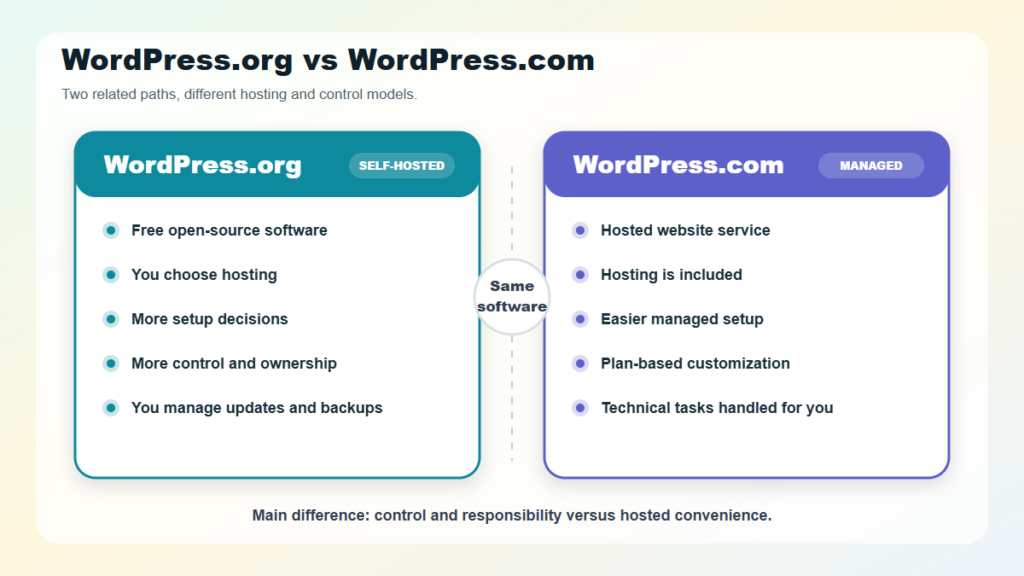
Here is the cleanest way to separate them:
- WordPress.org is the home of the free, open-source WordPress software.
- WordPress.com is a hosted website service that runs on WordPress and includes managed hosting.
| Question | WordPress.org / Self-Hosted WordPress | WordPress.com |
|---|---|---|
| What is it? | Free open-source WordPress software | Hosted website platform powered by WordPress |
| Hosting | You choose and pay for hosting separately | Hosting is included |
| Setup | More decisions and responsibility | Easier managed setup |
| Control | More control over files, themes, plugins, and customization | Control depends on the plan |
| Maintenance | You manage updates, backups, security, and hosting choices | Many technical tasks are handled for you |
| Best for | Flexibility, ownership, custom sites, developers, growing businesses | Simpler setup, managed hosting, less technical maintenance |
The official WordPress.org documentation explains that WordPress is the free, open-source publishing software project, while WordPress.com is a hosted service run by Automattic.
WordPress.com explains the practical difference similarly: the same WordPress software powers both, but WordPress.com includes managed hosting, whereas WordPress.org/self-hosted WordPress requires you to choose and manage hosting separately.
Is WordPress Free?
The WordPress software from WordPress.org is free and open source. But running a WordPress website is not always completely free.
With self-hosted WordPress, you may pay for:
- A domain name.
- Web hosting.
- Premium themes.
- Premium plugins.
- Security, backup, or performance tools.
- Developer support, maintenance, or custom design work.
With WordPress.com, your cost depends on the plan and features you choose.
So the most accurate beginner answer is: WordPress software can be free, but a complete WordPress website usually has some costs.
“Free software” and “free website” are not the same promise. WordPress gives you the software. You still need a place for the site to live, a domain people can visit, and the right tools to keep it useful and secure.
Why Is WordPress So Popular?
WordPress is popular because it gives users a rare mix of control, flexibility, and support.
As of July 24, 2026, W3Techs reports WordPress at 41.2% of all websites and 59.1% market share among websites with a known CMS. WordPress.org also states that WordPress powers more than 43% of the web, so editors should verify the exact figure before publication because usage statistics change over time.
People tend to choose WordPress for a few practical reasons:
- Flexibility: You can build many types of websites with the same platform.
- Content control: You can manage pages, posts, menus, categories, media, and users.
- Theme ecosystem: You can start with an existing design and customize it.
- Plugin ecosystem: You can add features without having to build everything from scratch.
- Community support: There are many tutorials, forums, agencies, developers, and learning resources.
- Room to grow: A simple website can become a larger content hub, store, or business platform.
WordPress is not popular because it is perfect for every website. It is popular because it can adapt to many website needs.
What Are Themes and Plugins?
Two words come up constantly in WordPress: themes and plugins.
A theme controls how your WordPress site looks. It affects layout, typography, colors, templates, headers, footers, and page design.
A plugin adds functionality. For example, plugins can add:
- Contact forms.
- SEO settings.
- Security scans.
- Backups.
- Caching and performance improvements.
- Ecommerce features.
- Analytics connections.
- Membership features.
- Page-building tools.
Themes mostly control appearance. Plugins mostly control features. In real websites, both work together.
Think of it this way: WordPress core gives your site its foundation, the theme shapes the experience visitors see, and plugins add the features your site needs to do its job.
What Are the Downsides of WordPress?
WordPress is powerful, but it does come with responsibilities.
The trade-offs usually show up in a few places:
- Maintenance: WordPress core, themes, and plugins need updates.
- Security: Poor passwords, outdated plugins, weak hosting, or missing backups can create risk.
- Plugin quality varies: not every plugin is well-built or well-maintained.
- Performance needs attention: Heavy themes, too many plugins, large images, or cheap hosting can slow a site down.
- Self-hosting has a learning curve: Domains, hosting, backups, caching, and security can feel confusing at first.
- Advanced customization can require code: Deep changes may need CSS, PHP, JavaScript, hooks, or custom plugin work.
These downsides do not mean WordPress is a bad choice. They mean WordPress works best when it is planned, maintained, and kept reasonably simple.
For beginners, that is often the healthiest mindset: start with what you need, avoid unnecessary plugins, keep your site updated, and improve it step by step.
How WordPress Fits Into WordPress Development
Understanding WordPress is the first step toward understanding WordPress development. Once you know how the dashboard, themes, plugins, hosting, and database fit together, it becomes easier to see what developers customize and why.
If you want the broader path from beginner concepts to custom builds, read our guide to WordPress development. It explains how WordPress sites are planned, built, customized, secured, optimized, and maintained beyond the basic definition.
Should You Use WordPress?
WordPress is a strong choice if you want a website that can grow with you.
It may be a good fit if you want:
- A blog or content-heavy website.
- A business website you can update over time.
- A portfolio or professional website.
- An ecommerce store with room to expand.
- A site with custom features.
- More ownership and flexibility than many closed website builders offer.
It may not be the best fit if you want the simplest possible one-page site, do not want to manage any technical decisions, or prefer a fully closed platform where most choices are handled for you.
Use this quick guide:
| Choose WordPress if… | Consider another option if… |
|---|---|
| You want flexibility and long-term control | You want the fastest simple setup |
| You plan to publish content regularly | You only need a temporary landing page |
| You may need custom features later | You do not want to manage hosting or updates |
| You want a large plugin and theme ecosystem | You prefer a tightly managed all-in-one builder |
How to Get Started With WordPress
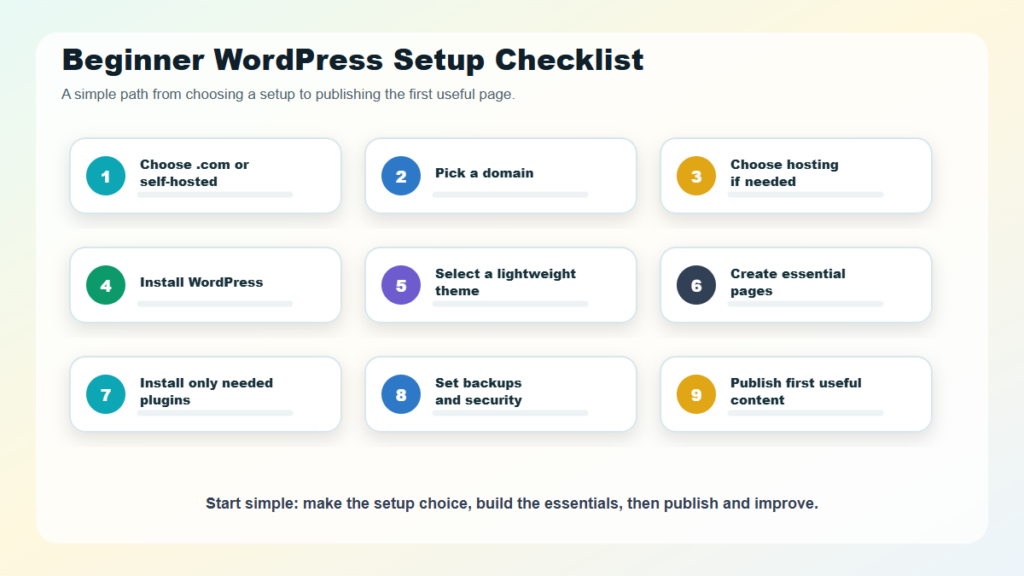
If you are new to WordPress, start with a simple path:
- Decide whether you want WordPress.com or self-hosted WordPress.
- Choose a domain name.
- Choose hosting if you use self-hosted WordPress.
- Install WordPress or create a WordPress.com site.
- Pick a lightweight theme.
- Create essential pages, such as Home, About, Contact, and Services.
- Install only the plugins you truly need.
- Set up backups, security basics, and performance basics.
- Publish your first useful page or blog post.
You do not need to learn every WordPress feature at once. Start with a clean, useful first version, then improve it over time.
That first version does not need to be perfect. It needs to be clear, stable, and useful enough to help the people you want to reach.
FAQs About WordPress
What is WordPress in simple terms?
WordPress is software that helps you build and manage a website. It gives you a dashboard to create pages, publish posts, upload images, change your design, and add features without having to code every page manually.
Is WordPress only for blogging?
No. WordPress started as a blogging tool, but it is now used for business websites, portfolios, online stores, news sites, membership sites, course websites, and custom web projects.
Is WordPress.org the same as WordPress.com?
No. WordPress.org is the home of the open-source WordPress software. WordPress.com is a hosted service that uses WordPress and includes managed hosting.
Do I need coding skills to use WordPress?
You do not need coding skills to use basic WordPress. Coding becomes more useful when you want advanced customization, custom themes, custom plugins, performance improvements, or complex troubleshooting.
Is WordPress good for beginners?
Yes, WordPress can be good for beginners, especially if they are willing to learn the basics of website management. WordPress.com is usually simpler to start with, while self-hosted WordPress gives more control and flexibility.
Is WordPress still worth using in 2026?
Yes, WordPress is still worth considering in 2026 for blogs, business websites, portfolios, content hubs, ecommerce, and custom websites. The right choice depends on your budget, technical comfort, and long-term website goals.
Final Thoughts
WordPress is a flexible website platform that can work for complete beginners and advanced developers. It helps you manage content, design, features, and publishing from one system.
The most important beginner decision is whether you want the control of self-hosted WordPress or the simpler managed setup of WordPress.com.
Once you understand that difference, WordPress becomes much easier to evaluate. It is not just a blogging tool. It is a full website platform that can grow with your content, business, or project.