

The best WordPress hosting is the one that matches your site’s needs, budget, traffic, and support requirements, and is upfront about long-term costs. Most beginners do well with a reliable shared or managed WordPress host. For online stores, busy business sites, or client projects, managed WordPress or managed cloud hosting is usually a safer choice.
A good WordPress host should offer modern PHP, MySQL or MariaDB, HTTPS, backups, caching, security features, and helpful support. WordPress.org now recommends at least PHP 8.3, MariaDB 10.11 or MySQL 8.0, and HTTPS, as listed on its official WordPress requirements page.
Instead of asking, “Which host is best overall?” try asking, “Which host is least likely to cause problems for my specific site?”
Quick Answer: The Best WordPress Hosting Depends on Your Site
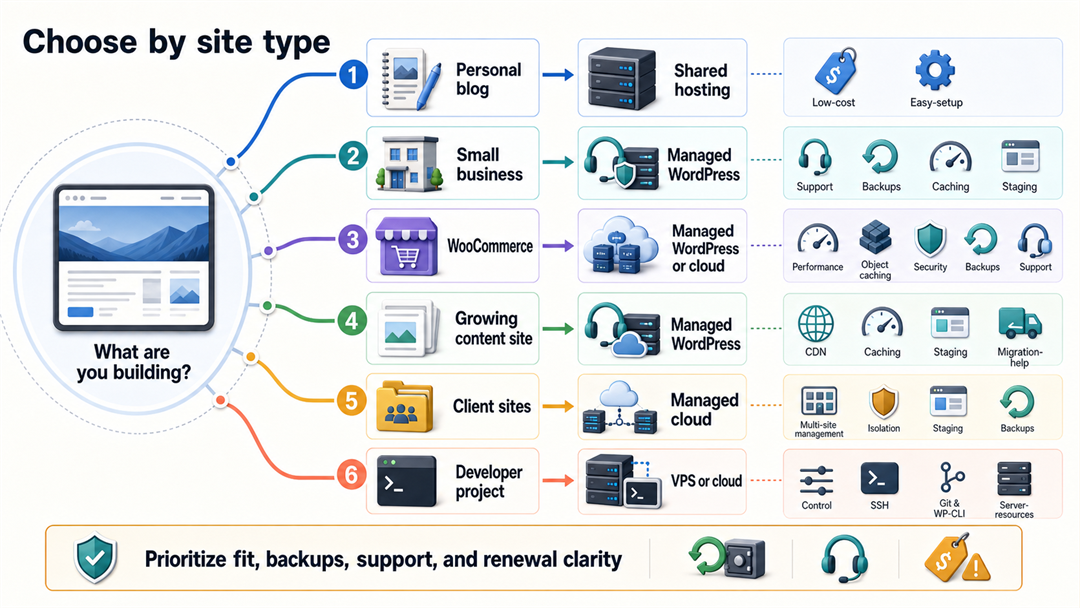
| If you are building… | Best hosting type | What to prioritize | What to avoid |
|---|---|---|---|
| A personal blog or simple starter site | Shared WordPress hosting | Low cost, easy setup, SSL, backups | Buying a large plan before you need it |
| A small business website | Managed WordPress hosting or stronger shared hosting | Support, daily backups, caching, staging | Plans with unclear renewal pricing |
| A WooCommerce store | Managed WordPress or managed cloud hosting | Performance, object caching, security, backups, support | Very cheap shared hosting with weak resources |
| A growing content site | Managed WordPress hosting | CDN, caching, staging, migration help | Hosts that throttle traffic quietly |
| Several client sites | Managed cloud hosting or agency-focused managed hosting | Multi-site management, staging, backups, isolation | One cheap account holding too many important sites |
| A developer project | VPS or managed cloud hosting | Control, SSH, Git, WP-CLI, server resources | Self-managed servers without maintenance time |
If you are just learning about WordPress, start with something simple. You can always switch hosts later. If your site will make money, collect leads, or use WooCommerce, pick hosting with strong support and backups from the beginning.
What Makes Hosting Good for WordPress?
WordPress works on many hosts, but there’s a difference between a site that just runs and one that runs well.
At a minimum, your host should support the official WordPress software requirements. WordPress.org lists PHP, a supported MySQL or MariaDB database, and HTTPS as the core baseline. It also notes that Apache or Nginx are recommended web servers, while any server that supports PHP and MySQL can work.
For a real website, look beyond the bare minimum. A good WordPress hosting plan should include:
- Free SSL/HTTPS so visitors and browsers trust the site.
- Automatic or easy WordPress installation so setup does not become a server project.
- Backups with a clear restore process, not just a vague “protected” claim.
- Caching or CDN support to help pages load faster.
- Current PHP versions with a simple way to upgrade.
- Security tools such as malware scanning, firewall protection, or suspicious-login protection.
- Support that understands WordPress, not only generic hosting tickets.
- Transparent renewal pricing because many low monthly prices are introductory.
Suppose you are still comparing WordPress.com vs WordPress.org; hosting matters mainly for WordPress.org. WordPress.com includes hosting inside its platform. Self-hosted WordPress.org gives you more control, but you are responsible for choosing and managing the host.
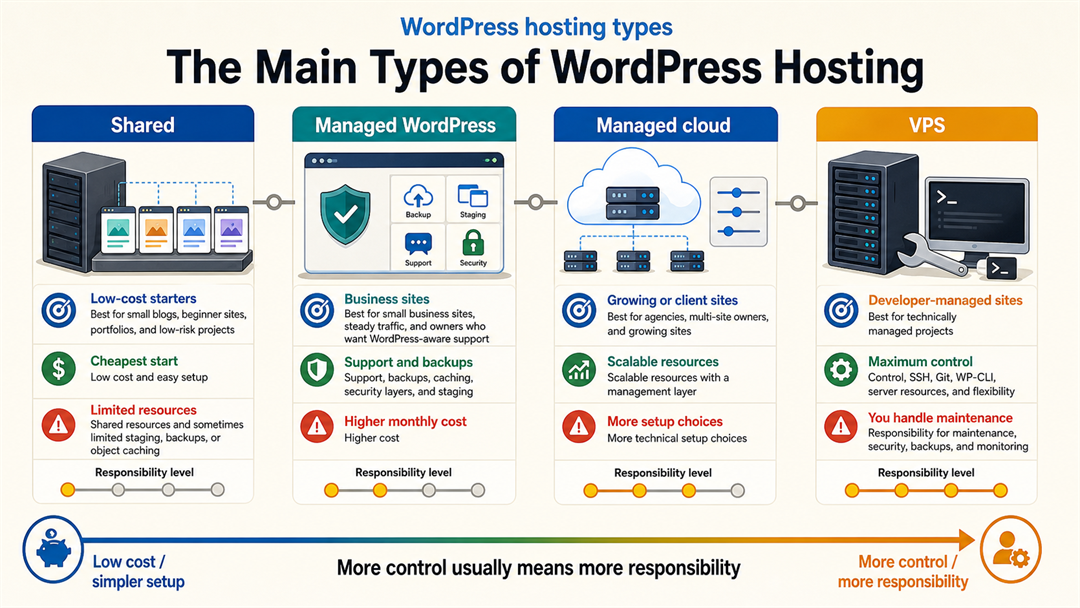
The Main Types of WordPress Hosting
Hosting terms can seem confusing, but they are simpler than they look. Here’s a straightforward explanation.
Shared WordPress Hosting
Shared hosting means your site shares server resources with other websites. It is usually the cheapest way to start.
Shared hosting works well for small blogs, simple business sites, portfolios, and beginner projects. The downside is that performance can drop when the server is busy, and advanced features like staging, daily backups, or object caching might be limited or only available on more expensive plans.
Choose shared hosting when the site is low-risk, and budget matters more than maximum speed.
Managed WordPress Hosting
Managed WordPress hosting is built around WordPress. The host usually handles server tuning, caching, updates, backups, security layers, staging, and WordPress-aware support.
Managed hosting costs more, but it takes away much of the hassle of maintenance. For business owners, paying a bit extra each month can be worth it because issues are easier to solve.
Choose managed WordPress hosting when the website supports a business, receives steady traffic, or needs dependable support.
Managed Cloud Hosting
Managed cloud hosting gives you cloud-server resources with a management layer on top. It can be a good middle ground for agencies, developers, and multi-site owners who want better performance without managing every server detail manually.
The trade-off is that managed cloud hosting still needs more technical know-how than basic shared hosting. You might need to understand things like server size, regions, caching, backups, and scaling.
Choose managed cloud hosting when you run several sites or expect growth but do not want a fully self-managed VPS.
VPS Hosting
A VPS, or virtual private server, gives you more control and dedicated resources than typical shared hosting. It can be powerful and cost-effective, but it also shifts more responsibility onto you.
If you are not comfortable handling server updates, security, backups, and monitoring, a VPS can quietly turn into a risk.
Choose VPS hosting when you have the technical skill or a developer managing the server.
Best WordPress Hosting Picks by Use Case
A good hosting recommendation should explain who each host is best for, not just rank brands.
Best for Beginners: A WordPress.org-Recommended Host With Easy Setup
For beginners, the safest path is usually a well-known host with one-click WordPress installation, SSL, guided setup, beginner support, and clear documentation. WordPress.org maintains an official hosting recommendations page that currently lists several recommended hosts.
That page is a good sign of trust, but it should not be your only reason for choosing a host. Also check renewal prices, backup policies, support options, storage, email limits, and whether you get daily or just weekly backups.
Best for Small Business Sites: Managed WordPress Hosting
A small business website needs stability more than bargain pricing. If your site brings leads, appointment requests, or local search traffic, downtime and slow pages are not small problems.
Look for features like daily backups, staging, caching, CDN support, malware protection, and support that understands WordPress. Paying a bit more for managed hosting is often less expensive than hiring someone to fix problems later.
This is also where WordPress development decisions start to matter. Hosting affects speed, security, maintenance, and how easily a developer can improve the site over time.
Best for WooCommerce: Performance-Focused Managed Hosting
WooCommerce stores put more pressure on hosting than simple brochure sites. Cart, checkout, account, and search pages may bypass page cache. That means raw server performance, database speed, object caching, and support quality matter more.
For WooCommerce, prioritize:
- Strong PHP and database performance.
- Daily backups with easy restore.
- Staging for testing plugin and theme updates.
- Security monitoring.
- Support that understands WooCommerce.
- Room to scale during campaigns or seasonal traffic.
Don’t pick WooCommerce hosting just because it’s the cheapest at first. Stores need reliable hosting, not just a low price.
Best Cheap WordPress Hosting: Cheap, But Not Fragile
Cheap hosting can work fine for a beginner blog or practice site. The real risk isn’t the low price itself, but choosing a plan that’s missing important features or that gets much more expensive when it renews.
Before you buy, check:
- The renewal price after the introductory term.
- Whether backups are daily, weekly, paid, or manual.
- Whether SSL is included.
- Whether email is included if you need it.
- Whether storage and inode limits are realistic.
- Whether support is live chat, ticket-only, or limited by plan.
If you are wondering if WordPress is free, remember that hosting is one of the main real costs. The WordPress software itself is free, but a real website still needs a domain, hosting, basic security, and ongoing maintenance.
Best for Developers and Agencies: Managed Cloud or VPS
Developers and agencies often need staging, SSH access, Git workflows, WP-CLI, multiple PHP versions, site cloning, and predictable scaling.
A managed cloud platform or a well-maintained VPS can be a good fit here. The main benefit is control, but the risk is extra maintenance. If no one is clearly in charge of updates, monitoring, backups, and server security, it’s better to choose managed hosting.
How to Choose the Best Hosting for WordPress
Here is the checklist I would use before paying for a WordPress hosting plan.
1. Start With the Site’s Real Purpose
A hobby blog, restaurant website, course platform, and WooCommerce store do not need the same host.
Ask:
- Will this site generate leads or sales?
- Will visitors log in or buy products?
- Will the site use WooCommerce, memberships, or bookings?
- How painful would one day of downtime be?
- Who will maintain updates and backups?
If your site matters to your business, think of hosting as essential infrastructure, not just a place to save money.
2. Check WordPress Requirements
Use the official WordPress requirements as your floor, not your goal. Your host should support modern PHP, MySQL or MariaDB, HTTPS, and common WordPress server features.
If a host can’t clearly tell you which PHP and database versions they use, that’s a warning sign.
3. Compare Renewal Price, Not Just Intro Price
Many hosting plans advertise a low first-term price. Renewal can be much higher.
Before you buy, check what the second year will cost. A host that seems pricey at first might actually be similar or even cheaper after renewal. This simple step can save you from buyer’s remorse.
4. Look at Backups and Restore Rules
Backups aren’t helpful if restoring them is slow, costs extra, is confusing, or can’t be done without help from support.
Check:
- Backup frequency.
- Backup retention period.
- One-click restore availability.
- On-demand backups before major updates.
- Whether backups are included or paid add-ons.
For business sites, daily backups should be the default expectation.
5. Check Caching, CDN, and Performance Tools
Speed isn’t just about your host, but hosting is the foundation. Look for server-level caching, CDN integration, modern PHP, object caching, and enough resources for your theme and plugins.
Don’t focus too much on a single speed test. A brand new test site can be fast on almost any host, but your real site might use a page builder, forms, ecommerce, analytics, ads, or heavy plugins.
6. Review Support Before You Need It
Support quality is hard to judge from a feature table. Still, you can look for clues:
- Is support 24/7?
- Is live chat included?
- Does support handle WordPress questions or only server issues?
- Are migrations included?
- Are higher support tiers locked behind expensive plans?
If your site is important, good support is part of what you’re paying for.
7. Make Sure You Can Move Later
A good host shouldn’t feel like a trap. Make sure you can access your files, export your database, manage DNS, and get backups. If a host uses a custom builder or special setup, find out what happens if you want to move your site later.
If you already have a host and need to get the site live, follow a careful WordPress installation process so domain, SSL, database, and login details are set up correctly.
WordPress Hosting Red Flags
Be careful when you see:
- No clear renewal pricing.
- No easy backup restore.
- Outdated PHP versions.
- Vague “unlimited” claims with hidden resource limits.
- No staging on business-critical plans.
- Support that cannot answer basic WordPress questions.
- Security features described only in broad marketing language.
- Very cheap plans recommended for stores, memberships, or heavily trafficked sites without caveats.
None of these signs automatically mean a host is bad. They just mean you should ask more questions before you buy.
Do You Need Managed WordPress Hosting?
You need managed WordPress hosting if your website is important enough that downtime, failed updates, malware, or slow pages would cost you more than upgrading your hosting.
You probably don’t need managed hosting for a small personal blog, a learning project, or a simple site with little traffic. Start simple, keep backups, and upgrade when your site grows.
The moment the site supports a business, store, or client relationship, managed hosting becomes easier to justify.
Final Recommendation
For most beginners, the best WordPress hosting is a reliable plan with SSL, backups, up-to-date PHP, easy setup, and support that really understands WordPress. For business sites and WooCommerce stores, go with managed WordPress or managed cloud hosting that offers stronger backups, staging, caching, and security.
Don’t just pick the cheapest host. Choose the one that matches how important your site is.
FAQ
What is the best hosting for WordPress overall?
The best hosting for WordPress overall is the one that fits your site type. Beginners can start with reputable shared or beginner-managed hosting, while business sites and WooCommerce stores usually benefit from managed WordPress hosting with stronger performance, backups, staging, and support.
Is shared hosting enough for WordPress?
Shared hosting is enough for many small WordPress sites, blogs, portfolios, and beginner projects. It is less ideal for WooCommerce, membership sites, high-traffic sites, and business-critical websites because resources and advanced tools may be limited.
What does WordPress.org recommend for hosting?
WordPress.org maintains an official hosting recommendations page and a separate requirements page. Use those as trust and compatibility references, but still compare pricing, backups, support, performance tools, and renewal terms before choosing.
How much should WordPress hosting cost?
WordPress hosting can cost only a few dollars per month for starter shared hosting, while managed WordPress hosting often costs more. The exact price changes often, so compare renewal pricing and included features instead of judging only by the first advertised monthly price.
Is managed WordPress hosting worth it?
Managed WordPress hosting is worth it when the site supports a business, store, client project, or steady traffic. It is less necessary for a personal learning project where low cost matters more than support, staging, and advanced performance tools.
Can I change WordPress hosting later?
Yes, you can move a WordPress site to another host later. Before choosing a host, confirm that you can export your files and database, access backups, control DNS, and migrate without being locked into a proprietary builder or closed platform.