
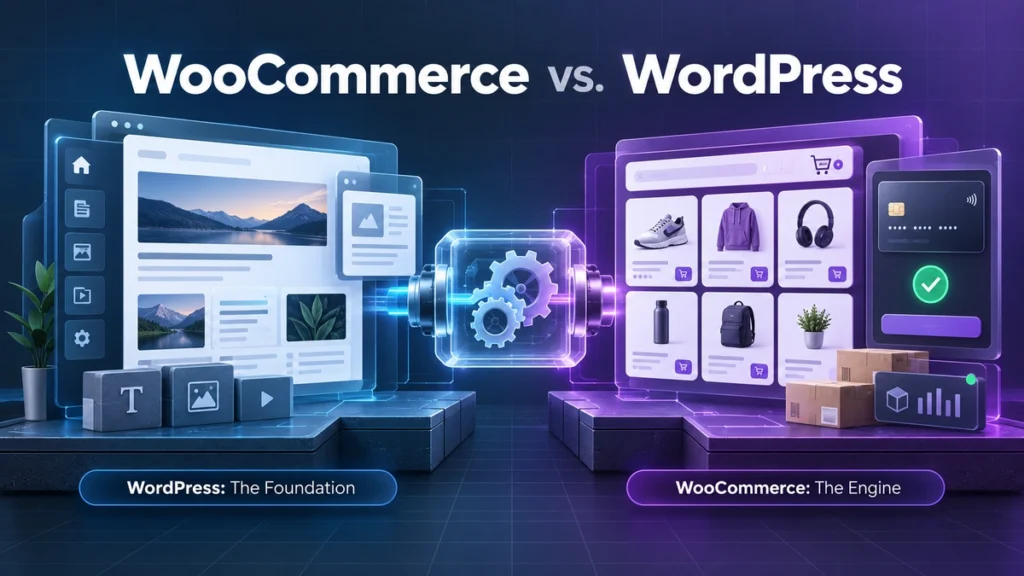
If you are searching for WooCommerce vs WordPress, you may think you must choose between two rival website platforms. The comparison is slightly misleading: WordPress is the website foundation, while WooCommerce is the e-commerce extension that turns that foundation into a store.
The Fundamental Relationship: Understanding the Engine and the Vehicle
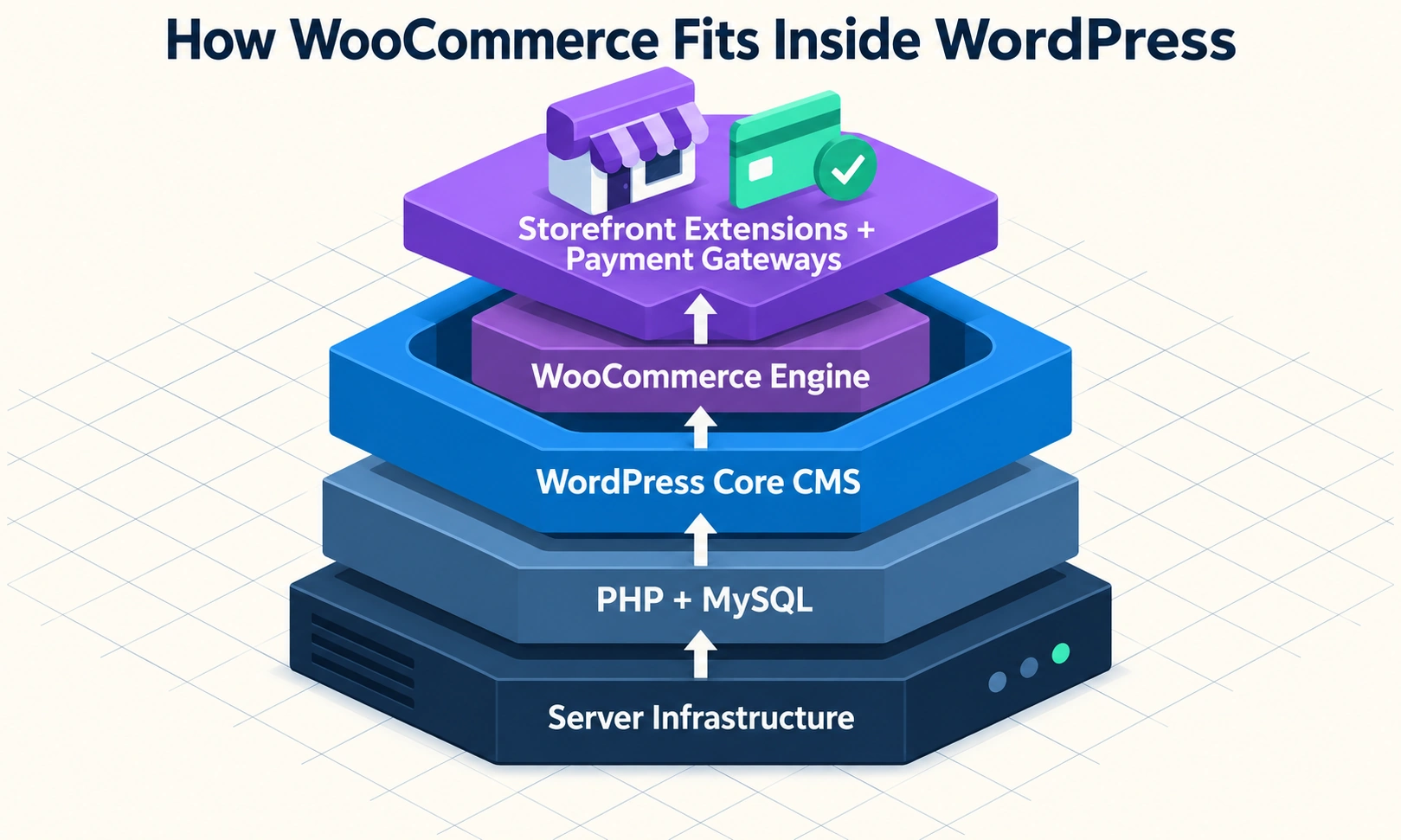
WooCommerce vs WordPress (Direct Answer): WordPress is an open-source Content Management System (CMS) used to build and manage general websites. WooCommerce is a specialized e-commerce plugin that installs on top of WordPress to add online store functionality. You cannot use WooCommerce without WordPress; they work together as platform and application.
| Comparison point | WordPress | WooCommerce |
|---|---|---|
| Purpose | Builds and manages websites | Adds e-commerce functionality |
| Software type | Content management system | WordPress plugin and commerce engine |
| Works independently? | Yes, as a website foundation | No; it requires WordPress |
| Main server role | Renders pages, posts, media, and themes | Processes products, carts, orders, and checkout |
| Default output | Content site, blog, portfolio, or business website | Online store running inside WordPress |
Think of WordPress as the house. It provides the rooms, doors, utilities, user accounts, and address. WooCommerce is the retail fit-out: shelving for products, a checkout counter, stock records, shipping rules, and payment connections. The fit-out makes the house suitable for selling, but it does not replace the house.
WordPress is a content management system. Its core handles pages, blog posts, media, themes, user roles, menus, and the database connection that allows the site to work. Its Block Editor, REST API, and large plugin ecosystem support everything from a personal blog to a complex publishing operation. The WordPress.org documentation explains the platform’s core publishing model and open-source ecosystem.
WooCommerce is an open-source PHP plugin maintained by Automattic and its wider community. Once activated, it adds products, orders, customer accounts, coupons, taxes, shipping zones, and payment gateway connections to the WordPress dashboard. Both WordPress and WooCommerce core software are available under the GPLv2 open-source model, although hosting, extensions, development, and payment processing may cost money.
The scale of the ecosystem matters. W3Techs reports that WordPress powers more than 43% of all websites. WooCommerce is one of the most widely used e-commerce systems, with millions of active installations. Those figures do not mean every site needs a store; they show that the architecture supports both publishing and commerce.
What WordPress Does as the Foundational CMS
Standalone WordPress is well suited to publishing and presentation. It can create static pages, dynamic blog articles, landing pages, portfolios, resource libraries, and custom content types. It also manages the media library, author permissions, navigation, templates, and the editorial workflow behind the site.
That makes WordPress a strong choice for an editorial magazine, corporate brochure site, local service business, personal brand, or affiliate marketing blog. A business can collect leads with a form, send visitors to a booking service, or monetize content through advertising and sponsorship without installing an e-commerce engine.
What WooCommerce Adds to the WordPress Foundation
WooCommerce adds transactional behavior. It creates the product catalogue, shopping cart, checkout, customer account area, order records, inventory controls, shipping zones, tax rules, coupons, and payment gateway hooks needed to complete a sale.
It can sell physical merchandise, digital downloads, variable products such as size-and-color combinations, subscriptions, bookings, gift cards, and other specialized products through extensions. It also uses WordPress’s existing users, themes, media, and content tools, so a store can publish a blog and sell products from the same dashboard.
The Core Misconception: Can You Use WooCommerce Without WordPress?
No. WooCommerce requires WordPress. It is not a standalone website builder or a hosted e-commerce service that runs directly on a server by itself. It is a PHP plugin designed to execute within the WordPress core runtime and use WordPress’s database, user system, hooks, and plugin APIs.
The confusion usually comes from hosting language. A provider may advertise “WooCommerce hosting,” a “managed WooCommerce plan,” or a “one-click WooCommerce installer.” These products package WordPress and WooCommerce together, often with a theme, payment setup, caching, backups, and extra server resources. The label describes the intended workload, not a separate underlying platform.
That distinction matters when you choose a domain, host, backup system, or developer. You are deploying WordPress with WooCommerce installed on it. If you remove WordPress, WooCommerce has no runtime in which to operate.
Why Beginners Get Confused by Hosting Marketing
WordPress hosting plans often target blogs and brochure sites. WooCommerce plans target stores, so they may include more CPU, memory, PHP workers, staging, object caching, and backup retention. A host may also pre-install WooCommerce to shorten setup.
The premium reflects the workload: product queries, customer sessions, inventory changes, carts, order processing, and payment callbacks. Still, “WooCommerce hosting” does not mean you have found an alternative to WordPress.
The Technical Dependency: How WooCommerce Executes Inside WordPress
When a visitor opens a product page, the server starts the WordPress runtime, connects to the database, loads the active theme and plugins, and then runs WooCommerce code. WooCommerce uses WordPress hooks and filters to add the product price, stock status, add-to-cart behavior, customer session, and checkout logic.
In plain language, WordPress opens the shop and provides the building systems. WooCommerce supplies the sales process. The plugin can register product content types and commerce tables, but it still depends on the WordPress core APIs and database connection.
Feature and Capability Comparison: Content vs. Commerce
The most useful way to compare WordPress and WooCommerce is to compare their jobs. WordPress manages content and the site experience. WooCommerce adds the state changes and business rules required for commerce.
| Capability | WordPress core | WooCommerce add-on |
|---|---|---|
| Publishing | Pages, posts, categories, tags, and media | Product descriptions and store content layered onto WordPress |
| Design | Themes, block editor, templates, and styles | Product, cart, checkout, and account templates |
| Users | Roles, permissions, profiles, and logins | Customer accounts, order history, and purchase records |
| Data | Content and media records | Products, stock, orders, coupons, taxes, and shipping |
| Payments | No native product checkout | Payment gateways such as Stripe and PayPal |
| Fulfillment | No native inventory workflow | Shipping zones, rates, taxes, and order processing |
Adding WooCommerce does not remove WordPress’s content features. A retailer can run a product catalogue, buying guide, email capture funnel, and editorial blog in one site. Conversely, installing WooCommerce on a site that never sells anything creates extra scripts, database records, and maintenance work without adding value.
What You Can Build with Standalone WordPress
Choose WordPress alone when the site’s main job is to explain, persuade, publish, or collect leads. Common examples include:
- An editorial publication or news-style website.
- A corporate website with services, case studies, and contact forms.
- A freelance portfolio or personal branding hub.
- An affiliate website monetized through referrals and display advertising.
- A local business website that sends appointments to Calendly or another booking service.
- A membership publication using a focused content-restriction tool rather than a full product catalogue.
These sites benefit from simple page caching and a smaller plugin footprint. If you are still learning the platform, a guide to what WordPress is can provide the foundation before you evaluate store features.
Product Types and Sales Models Unlocked by WooCommerce
WooCommerce becomes appropriate when the website must own the customer’s buying journey. It supports simple physical products, downloadable files, variable products, subscriptions, bookable services, and digital gift cards. Extensions can add recurring billing, advanced shipping, tax automation, memberships, product bundles, and specialized checkout flows.
This flexibility creates more responsibility. You must define inventory, tax, shipping, refunds, payment failures, customer data retention, and fulfilment. A store is an operational system, not simply a blog with a “Buy” button.
The Real Financial Picture: 1 to 3-Year Total Cost of Ownership (TCO)
The phrase “free WordPress and free WooCommerce” describes the core software, not the finished business. Both can be downloaded without a license fee, but the real cost includes a domain, hosting, premium extensions, maintenance, development, and payment processing.
The following model uses a maximum three-year horizon. Longer projections become less reliable because hosting plans, payment terms, software versions, and business needs change quickly.
| Scenario | Year 1 | Year 2 | Year 3 | Three-year fixed total |
|---|---|---|---|---|
| Lean content blog | $47.86 | $97.86 | $97.86 | $243.58 |
| Boutique WooCommerce store | $359.86 | $422.86 | $422.86 | $1,205.58 |
| High-volume commercial store | Varies | Varies | Varies | Hosting, extensions, maintenance, and development require a custom model |
These totals exclude your time and variable card-processing fees. They are planning examples, not universal quotes.
The Budget Content Site: Realistic 1 to 3-Year WordPress Operating Expenses
For a lean content site, the model uses a .com domain at $11.98 in Year 1 and $13.98 in each renewal year, plus shared hosting at $35.88 in Year 1 and $83.88 in Years 2 and 3. A free block theme and free essential plugins keep design and plugin costs at zero.
That produces a Year 1 total of $47.86, followed by $97.86 in Year 2 and $97.86 in Year 3. The three-year total is $243.58, or about $81.19 per year. A site with premium design, paid backups, email marketing, or professional maintenance will cost more.
The Boutique Store: Realistic 1 to 3-Year Costs of Running WooCommerce
The store model uses managed e-commerce hosting at $179.88 in Year 1 and $299.88 in each renewal year. It adds one Table Rate Shipping extension at $109 per year, while the domain follows the same $11.98/$13.98 schedule. With a free theme, the fixed totals are $359.86 in Year 1 and $422.86 in Years 2 and 3. Check current domain pricing, hosting terms, and WooCommerce extension pricing before budgeting.
The three-year fixed total is $1,205.58. A subscription extension can add $239 per year, while Bookings can add $249 per year. WooCommerce charges 0% platform commission, but payment processors still charge their own fees. Stripe’s standard US online card rate is commonly stated as 2.9% plus $0.30 per successful transaction, subject to account, region, and payment-method terms.
For example, $25,000 in annual sales across 500 transactions would produce approximately $875 in card-processing fees at that rate. Those costs scale with revenue, not with the number of WordPress plugins you install. This is one reason to compare a platform’s commission structure separately from its monthly software cost.
Server Infrastructure and Performance: Why WooCommerce Demands More Power
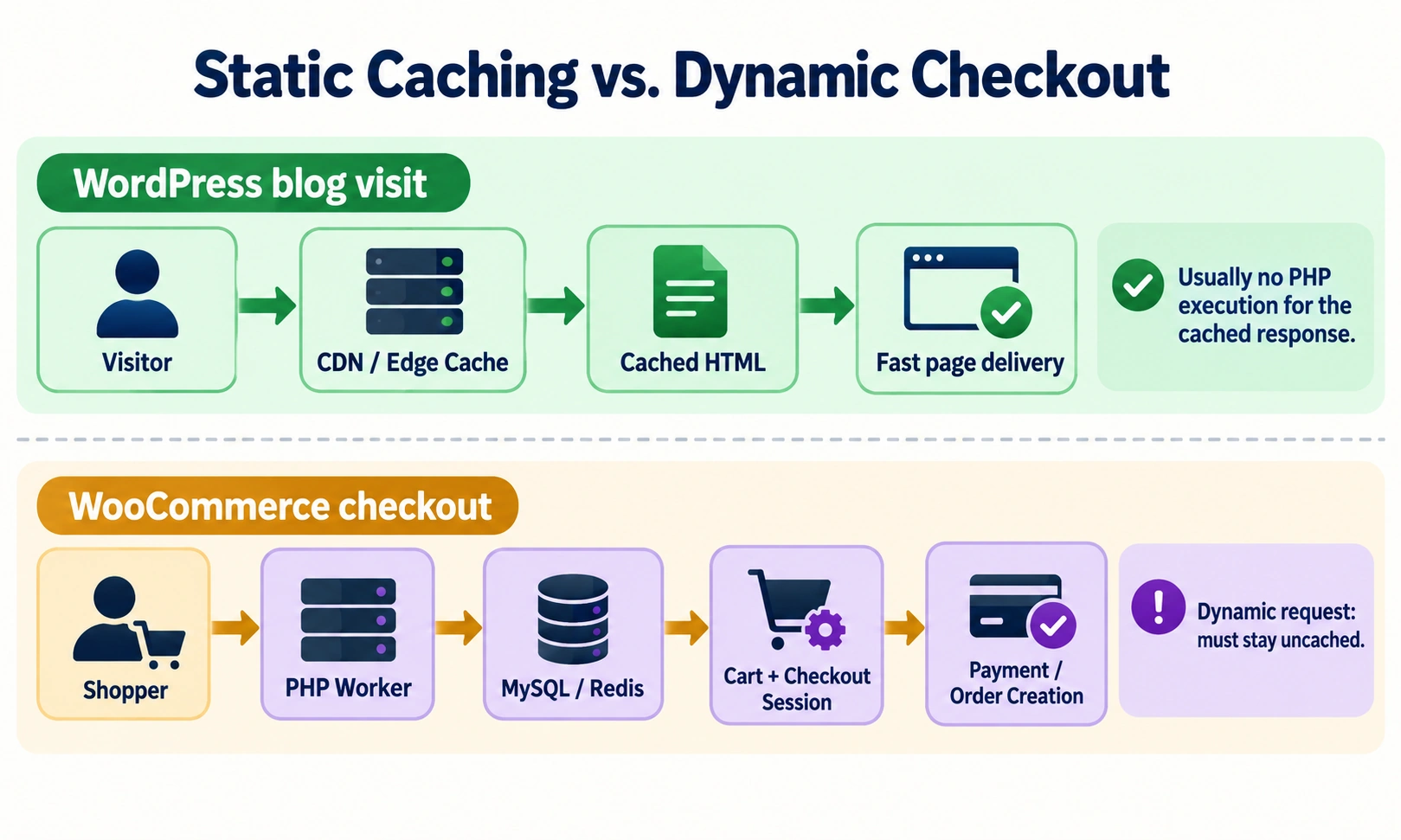
A standard WordPress site can serve many visits from a cached HTML file. A visitor reading an article does not need a unique database result every time. A store cannot treat every request that way: the cart, stock level, customer account, shipping destination, and checkout session can differ for every shopper.
WooCommerce marks transactional pages such as /cart/, /checkout/, and /my-account/ so they bypass full-page caching. The DONOTCACHEPAGE constant helps prevent a dangerous result in which one customer receives another customer’s cart or account page. AJAX cart fragments and payment callbacks also require dynamic processing.
Static Edge Caching vs. Uncacheable E-Commerce Requests
Static page caching is like a self-service vending machine: the server hands out a prepared copy quickly. Dynamic checkout is like a staffed supermarket lane: a PHP worker must inspect the current basket, calculate totals, apply a coupon, check inventory, and create or update a session.
That is why “WordPress hosting” and “WooCommerce hosting” can have different resource recommendations. A blog may work well on lean shared hosting. A small shop should usually have enough PHP workers, memory, database capacity, backups, and object caching for its traffic pattern.
PHP Workers and Database Optimization: The Secret to Fast Checkouts
A PHP worker is a server process that handles an application request. If all workers are busy, the next shopper waits. A small store may start with two or three workers; a store with concurrent shoppers, campaigns, or flash sales may need four to eight or more, depending on the host and application.
Cheap shared hosting can become a bottleneck when it provides only one or two workers and strict CPU limits. Symptoms include slow cart updates, failed payment callbacks, and 504 Gateway Timeout errors. Redis or Memcached object caching can reduce repeated database work, but caching does not fix an undersized server or inefficient plugin. Use this WordPress hosting selection guide to compare resource tiers before launch.
| Metric / resource | Standalone WordPress content blog | Boutique WooCommerce store (1–20 orders/day) | High-volume e-commerce store (50+ orders/day) |
|---|---|---|---|
| Recommended server tier | High-quality shared or cloud starter | Managed WooCommerce VPS or cloud hosting | Dedicated cloud server or high-tier managed cloud |
| PHP workers | 1–2 dedicated workers | 2–4 dedicated workers minimum | 4–8+ dedicated workers with autoscaling |
| PHP memory limit | 128–256 MB | 256–512 MB | 512–1,024 MB |
| Object caching | Optional; page cache is often sufficient | Recommended; persistent Redis object cache | Mandatory; dedicated Redis instance |
| Page caching | Aggressive static edge caching | Cache blog/catalog pages; bypass /cart/ and /checkout/ | Dynamic requests bypass cache; use Redis for transients and queries |
| Estimated monthly hosting budget | $2.99–$6.99 | $14.99–$24.99 | $30.00–$80.00+ |
Database Scalability: Legacy Postmeta vs. High-Performance Order Storage (HPOS)
Older WooCommerce installations stored orders as custom post types in wp_posts, with many associated values in wp_postmeta. An order with addresses, line items, fees, shipping, and payment details could create dozens of metadata rows. At scale, repeated joins and broad metadata searches made order administration and checkout queries harder to optimize.
Modern WooCommerce provides High-Performance Order Storage (HPOS), which moves order data into dedicated, indexed transactional tables such as wp_wc_orders and related address and operational tables. The goal is to keep commerce data separate from editorial content and make common order queries more direct.
| Database model | Legacy postmeta storage | HPOS |
|---|---|---|
| Primary location | wp_posts and wp_postmeta | Dedicated WooCommerce order tables |
| Best suited to | Older compatibility workflows | Modern transactional workloads |
| Main risk | Large metadata joins and database bloat | Extension compatibility must be checked |
| Content separation | Orders share content tables | Orders are isolated from posts |
| Reported benchmark | Depends heavily on query shape | Up to 70% faster queries and up to 5x faster order creation in WooCommerce benchmarks |
Why Legacy WooCommerce Strained the WordPress Database
The old approach was not automatically broken, but it was inefficient for large order volumes. If one order generated 30 to 50 metadata rows, 10,000 orders could contribute hundreds of thousands of rows. Search, reporting, and checkout work then competed with ordinary content queries.
Database size is not the only performance metric. Query shape, indexes, PHP capacity, extensions, object caching, and checkout flow all matter. A small store can run well on the traditional model; a growing store should plan its data architecture.
How HPOS Solves the E-Commerce Bottleneck in Modern WordPress
HPOS uses dedicated tables and WooCommerce CRUD methods to keep order operations aligned with the commerce domain. WooCommerce’s HPOS developer documentation describes the feature and its reported performance improvements.
Before enabling or disabling compatibility synchronization, confirm that every payment, reporting, fulfilment, and CRM extension supports HPOS. Run the change on staging, test checkout and refunds, and keep a verified backup. HPOS improves the architecture, but a careless migration can still create an operational problem.
Security, Maintenance, and PCI-DSS: Managing Operational Risk
A content site and a store both need updates, strong authentication, backups, and secure hosting. A store adds more sensitive workflows: customer accounts, addresses, order histories, refunds, payment callbacks, and integrations with fulfilment systems.
Use HTTPS with a certificate such as Let’s Encrypt, keep WordPress and extensions current, protect administrator accounts with multi-factor authentication, and maintain automated offsite backups. Run updates on staging when the site processes revenue. Tools such as Wordfence or Patchstack can help with monitoring, but they do not replace a tested recovery plan.
Content Security vs. Transactional Security: The Compliance Divide
Payment gateways can reduce exposure by using tokenized hosted fields or redirects. With a properly configured Stripe or PayPal integration, the store should not store raw card numbers on its own WordPress server. That can simplify the merchant’s PCI-DSS obligations, but it does not eliminate them.
The applicable Self-Assessment Questionnaire depends on the payment flow and how the merchant’s systems interact with cardholder data. Review the current guidance from the PCI Security Standards Council and your payment provider rather than assuming every integration qualifies for the same form.
The Silent Failure Update Trap: Testing E-Commerce Safely
If a blog widget breaks, the damage may be visible quickly. If a checkout button breaks, the site can still return an HTTP 200 response while customers abandon their carts. An uptime monitor may show green even though revenue has stopped.
Use a staging clone, test product pages, coupons, shipping, tax, payment authorization, order emails, refunds, and mobile checkout after major updates. Keep a rollback path. For stores, “updated” is not the same as “verified.”
Definitive Decision Protocol: Should You Use WordPress Alone or Add WooCommerce?
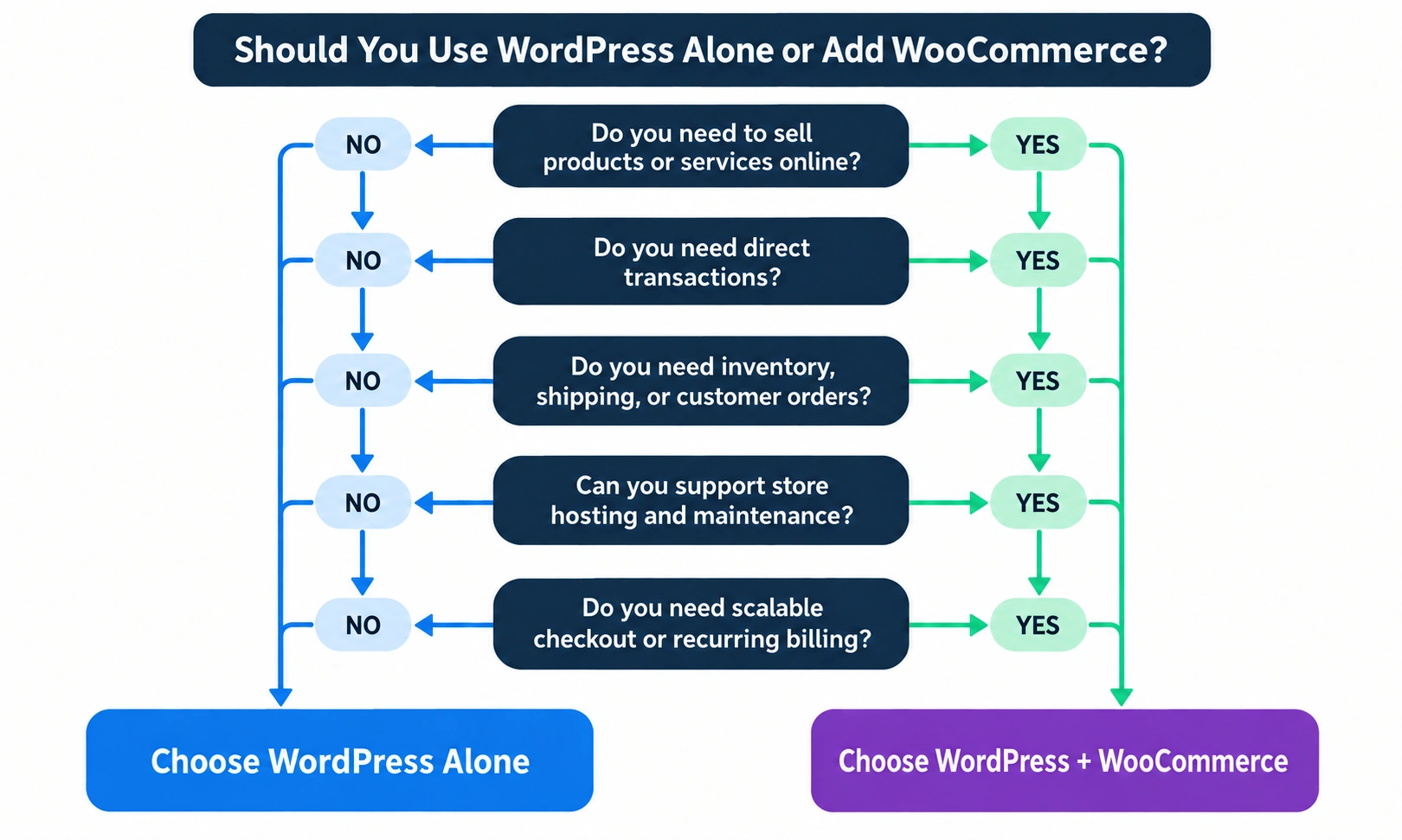
Use the business model, not the product name, to make the choice. Start with one question: Does the site need to create and manage orders directly? If the answer is no, WordPress alone is usually the cleaner architecture. If the answer is yes, WooCommerce may be the right engine, provided you budget for its operational requirements.
Do not add WooCommerce “just in case.” Premature e-commerce optimization increases plugin count, database work, update risk, and hosting needs before the business has a sales workflow to justify them.
Scenario A: The Content Publisher, Blogger, or Service Business (Choose WordPress Alone)
Choose standalone WordPress when:
- Revenue comes from consulting, services, sponsorships, or display advertising.
- Leads arrive through forms, phone calls, or a third-party booking tool.
- Affiliate links send customers to another merchant.
- The site is an editorial publication, portfolio, brochure site, or resource hub.
- You do not need inventory, shipping rules, customer accounts, or order history.
This setup keeps the database and checkout surface smaller. You can still add a focused membership, form, or booking plugin later. A practical WordPress speed guide can help you protect performance as content grows, while self-hosted WordPress architecture guidance explains the infrastructure trade-offs.
Scenario B: The Digital Creator, Retailer, or Subscription Merchant (Choose WordPress + WooCommerce)
Choose WooCommerce on WordPress when:
- You sell physical products and control fulfilment.
- You deliver software, eBooks, courses, or other digital files directly.
- You need subscriptions, memberships, product variations, or recurring billing.
- You require custom checkout logic or integrations with inventory and accounting systems.
- Avoiding a platform commission matters as sales volume grows.
Expect to manage hosting, payment settings, extensions, backups, security, and testing. If you are moving an existing site or changing hosts, a WordPress migration guide covers files, databases, DNS, redirects, and launch checks. You can outsource WordPress maintenance and WooCommerce support when the store needs regular staging, updates, and monitoring.
For the broader platform context, see this Squarespace vs. WordPress comparison. It helps distinguish a hosted all-in-one service from the self-hosted WordPress architecture that WooCommerce extends. If a checkout or plugin conflict occurs, use a structured WordPress bug-fix process before changing production files.
Frequently Asked Questions
Can I turn an existing WordPress website into a WooCommerce store later?
Yes. Because WooCommerce is a standard WordPress plugin, you can install and activate it on an existing WordPress site at any time. It preserves your existing pages, posts, and theme while adding products, carts, checkout pages, and order management. Test the design, hosting, and plugin compatibility before launch.
Is WooCommerce free to use on WordPress.com?
WooCommerce core is free, but WordPress.com requires a qualifying paid plan to install plugins. On self-hosted WordPress.org, you can install WooCommerce on a hosting plan of your choice. Confirm current WordPress.com plan pricing and features before buying because plan names and prices can change.
Does installing WooCommerce slow down my WordPress website?
It can add work, but it does not automatically make a site slow. The biggest risks are cheap hosting, too few PHP workers, inefficient extensions, uncached cart fragments, and unoptimized queries. HPOS, object caching, image optimization, and careful testing can keep a well-configured store responsive.
Is WooCommerce better than Shopify or Squarespace?
WooCommerce is better when you value data ownership, customization, and 0% platform transaction fees. Shopify and Squarespace are often easier for beginners because hosting and core operations are managed for you. Compare the convenience premium, extension costs, platform fees, and maintenance responsibility against your team’s skills.
What is the difference between WordPress and WooCommerce?
WordPress is the CMS; WooCommerce is the e-commerce plugin. WordPress manages pages, posts, media, themes, users, and the site framework. WooCommerce adds products, carts, checkout, orders, shipping, taxes, inventory, and payment integrations. In most cases, you use them together rather than selecting one instead of the other.
Conclusion: Choose the Foundation First, Then Add the Store
The real answer to WooCommerce vs WordPress is usually “WordPress plus WooCommerce,” not one or the other. WordPress is the open-source CMS foundation. WooCommerce is the commerce engine that adds products, checkout, payments, inventory, and orders.
Use WordPress alone for publishing, lead generation, portfolios, services, and affiliate content. Add WooCommerce when direct product sales, digital delivery, subscriptions, or custom checkout justify the extra hosting, security, database, and maintenance requirements. That decision keeps the architecture aligned with the business instead of adding complexity before it creates value.
*Pricing, product features, payment rates, and hosting plans change. Verify current terms and obtain professional tax, security, and PCI-DSS advice for your business before launch.*