

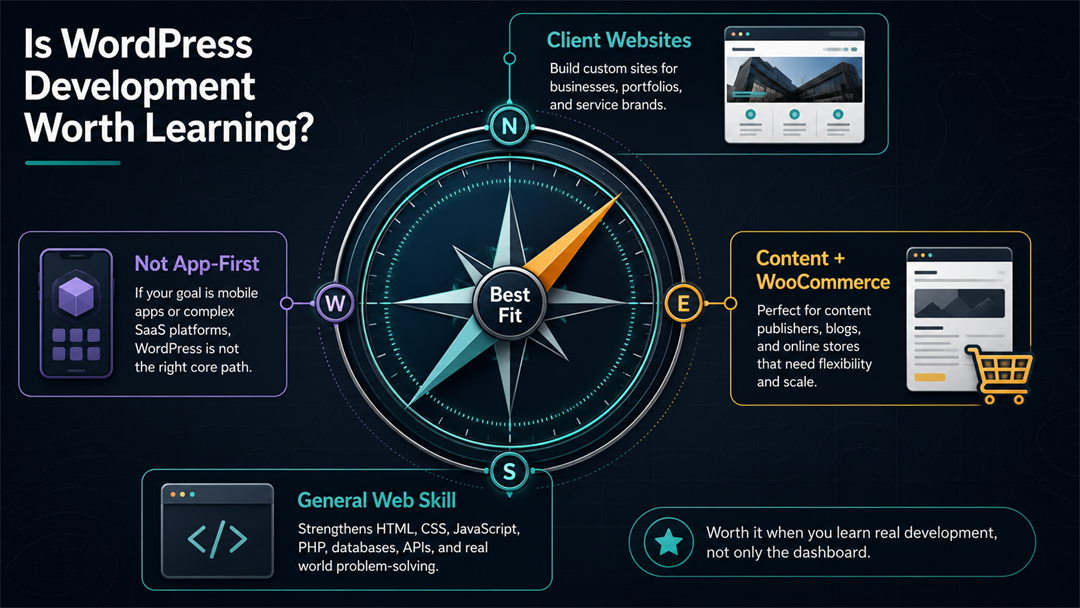
Yes, learning WordPress development is a good choice if you want to build websites for clients, customize business sites, work with content-heavy sites, support WooCommerce stores, or get to know one of the most popular website platforms. Still, it is not the right path for everyone.
The key is to treat WordPress development as real web development, not just using the dashboard. Valuable skills include HTML, CSS, JavaScript, PHP, themes, plugins, blocks, performance, security, and problem-solving. Simply installing random themes and plugins without understanding them is less useful.
According to W3Techs, as of July 24, 2026, WordPress powers 41.2% of all websites and holds a 59.1% share of the content management system market. This does not mean every developer should focus only on WordPress, but it is still a major, active, and commercially important platform.
Quick Verdict: Who Should Learn WordPress Development?
Check the table below if you want a quick answer before reading the details.
| Your Goal | Is WordPress Development Worth Learning? | Why |
|---|---|---|
| – | – | – |
| Freelancing for small businesses | Yes | Many small businesses need affordable, editable websites. |
| Agency website work | Yes | WordPress remains common for marketing sites, blogs, service pages, and client-managed content. |
| Building content-heavy websites | Yes | WordPress is built around publishing, editing, roles, media, taxonomies, and content workflows. |
| WooCommerce or ecommerce customization | Often yes | WooCommerce extends WordPress into online stores, where custom setup and maintenance can be valuable. |
| Becoming a general web developer | Yes, as a practical side skill | It teaches real web concepts, but should be paired with broader front-end and back-end fundamentals. |
| Building modern web apps only | Usually not as your main path | Frameworks such as React, Next.js, Laravel, Django, or similar stacks may fit app development better. |
| Avoiding code completely | Not really | You can use WordPress without code, but WordPress development eventually requires technical skill. |
If you are still exploring your options, start with the main WordPress development guide. It covers setup, themes, plugins, security, performance, and maintenance, helping you see how everything fits together before you pick a specialty.
What Does WordPress Development Mean?
WordPress development involves building, customizing, extending, and maintaining websites that use WordPress. The work can range from simple tasks to highly technical projects.
At the beginner end, it may include:
- Setting up WordPress on hosting
- Choosing and configuring a theme
- Installing useful plugins
- Creating pages, menus, forms, and blog layouts
- Making basic design changes with CSS
At the professional end, it can include:
- Building custom themes
- Creating custom plugins
- Working with hooks, filters, custom post types, and taxonomies
- Developing custom blocks for the Block Editor
- Integrating APIs
- Improving performance and Core Web Vitals
- Hardening security
- Debugging conflicts
- Maintaining production websites
This difference is important because when people ask, “Is WordPress worth learning?” they often mean one of three things:
- Is WordPress worth learning as a website owner?
- Is WordPress worth learning as a no-code site builder?
- Is WordPress development worth learning as a technical skill?
The third option offers the best opportunity. Knowing your way around the dashboard helps, but real development skills will take you much further.
Why WordPress Development Is Still Worth Learning
WordPress remains popular because it solves a common problem: people want websites they can edit themselves, without needing a developer for every small change.
That need still exists. AI website builders, hosted platforms, and visual design tools make it easier to create simple sites. However, businesses still need custom layouts, migrations, integrations, speed improvements, security fixes, plugin choices, content structure, and ongoing maintenance. These needs are not solved by just clicking “generate site” and leaving it at that.
WordPress Has a Large Installed Base
The WordPress ecosystem is very large. While the W3Techs numbers do not guarantee career success, they do show that many websites use WordPress.
Existing websites create ongoing work:
- Redesigns
- Speed optimization
- Security updates
- Plugin replacements
- Hosting migrations
- Theme rebuilds
- WooCommerce improvements
- Content and SEO structure updates
New tools might make basic setup easier, but they often create more demand for people who can fix, adapt, and maintain real websites after they go live.
WordPress Teaches Useful Web Fundamentals
Learning WordPress development helps you understand how websites really work.
You will meet:
- HTML for structure
- CSS for layout and responsive design
- JavaScript for interactivity and editor features
- PHP for WordPress server-side logic
- MySQL or MariaDB for database-backed content
- HTTP requests, forms, authentication, and APIs
- Accessibility and performance trade-offs
WordPress.org’s current requirements page recommends PHP 8.3 or higher, MariaDB 10.11+ or MySQL 8.0+, and HTTPS. These requirements show that WordPress is more than just a visual page builder. It runs on a real server stack.
The Block Editor Made Modern Skills More Important
Modern WordPress is increasingly centered around blocks. The official Block Editor Handbook describes the editor as a modular system where content is composed from blocks, and it also points developers toward APIs for extending that system.
For learners, this shift changes which skills matter most.
Old WordPress development often meant editing PHP templates and adding shortcodes. Those skills still appear in older sites, but modern WordPress work increasingly rewards people who understand:
- Blocks
- React-style JavaScript concepts
block.json- Theme configuration
- Editor controls
- Static and dynamic rendering
- Component-based thinking
The official Build your first block tutorial shows where serious WordPress development is heading. If you only learn from old theme tutorials, you might miss out on better long-term opportunities.
When WordPress Development Is Not Worth Learning
WordPress is a useful tool, but it is not the answer for every career path.
It may not be worth making WordPress your main focus if you want to:
- Build complex software-as-a-service applications
- Specialize in native mobile apps
- Work mostly in enterprise back-end systems
- Avoid PHP completely
- Focus only on highly interactive front-end products
- Build websites where a simple no-code tool is already enough
There is also a less effective way to “learn WordPress”: memorizing a few plugins, buying a multipurpose theme, and calling yourself a developer. This might help with small tasks, but it is not reliable. If a client site breaks, slows down, gets hacked, needs a custom integration, or outgrows the theme demo, limited knowledge will not be enough.
If you decide to learn WordPress, focus on the skills that help you when simple solutions are not enough.
WordPress Development vs General Web Development
WordPress development and general web development overlap, but they are not identical.
| Skill Area | WordPress Development | General Web Development |
|---|---|---|
| – | – | – |
| Main environment | WordPress core, themes, plugins, blocks, hosting | Many possible stacks, frameworks, and languages |
| Common languages | PHP, JavaScript, HTML, CSS, SQL | JavaScript, TypeScript, Python, PHP, Ruby, Go, Java, C#, and more |
| Typical projects | Marketing sites, blogs, business websites, ecommerce, memberships, content portals | Web apps, dashboards, APIs, platforms, tools, ecommerce, sites |
| Main advantage | Fast path to editable websites and client work | Broader career flexibility |
| Main limitation | Tied to WordPress architecture and ecosystem | Can take longer before you can ship useful client work |
For many beginners, the smartest path is not “WordPress or coding.” It is WordPress plus web fundamentals.
Learn enough WordPress to build real websites. Learn enough general web development to understand what WordPress is doing underneath. That combination is far stronger than treating WordPress as a shortcut around technical learning.
The WordPress Development Skills That Still Matter
Not every WordPress skill has equal value. Some skills make you replaceable. Others make you the person people call when the site matters.
1. WordPress Fundamentals
Start with the parts every WordPress site uses:
- Posts and pages
- Themes and templates
- Plugins
- Menus
- Media
- Users and roles
- Settings
- Permalinks
- Custom post types and taxonomies
If you are unsure about the basics, read up on what WordPress is before you start coding. Learning development is much easier when you understand how the platform works.
2. Themes and Front-End Customization
Themes control how a WordPress site looks and how templates are arranged. A beginner can start by adjusting an existing theme, but development work eventually requires deeper knowledge of templates, layout, responsive design, CSS, accessibility, and theme structure.
Make sure you understand how WordPress themes and plugins work before trying to customize everything. Themes are for presentation, while plugins usually handle functionality. Mixing them up can quickly lead to a site that is hard to maintain.
3. Plugins and Custom Functionality
Plugins are where WordPress becomes more than a publishing tool. They add forms, ecommerce, SEO tools, memberships, analytics, security features, integrations, and custom business logic.
The official Plugin Handbook introduction includes a core principle worth remembering: do not edit WordPress core files to add site functionality. For developers, that pushes you toward themes, child themes, plugins, hooks, and clean extension points.
4. PHP and WordPress Hooks
WordPress is built with PHP, so PHP still matters. You do not need to become a PHP expert on day one, but you should eventually understand:
- Functions
- Arrays
- Conditional logic
- Loops
- Template files
- Actions and filters
- Sanitization and escaping
- Debugging errors
Hooks are especially important. They let developers run code at certain points or change data without editing WordPress core files. Think of hooks as approved places to connect your own code.
5. JavaScript and Block Development
JavaScript matters more in modern WordPress than it did in older theme-heavy workflows. The Block Editor, also known as Gutenberg, uses JavaScript heavily. If you want to build custom blocks or editor experiences, you will need more than copy-and-paste snippets.
Learn WordPress provides an official Introduction to Block Development course for building a first custom block. That is a useful next step once you understand the dashboard, local development, and basic coding.
6. REST API and Integrations
The WordPress REST API lets developers interact with WordPress data through HTTP requests. The official REST API handbook explains that it provides a way to get data into and out of WordPress using methods such as GET, POST, PUT, and DELETE.
This matters when a WordPress site needs to connect with external tools, apps, front-end frameworks, mobile experiences, dashboards, or automation systems.
7. Security, Performance, and Maintenance
Many paid WordPress tasks are not glamorous. They are practical:
- Update the site without breaking it.
- Remove abandoned plugins.
- Improve page speed.
- Fix PHP warnings.
- Restore backups.
- Harden login security.
- Clean up bloated themes.
- Test forms and checkout flows.
These skills matter because they protect business results. A website that looks good but loads slowly, has broken forms, or fails after updates is not truly complete.
A Practical Learning Roadmap
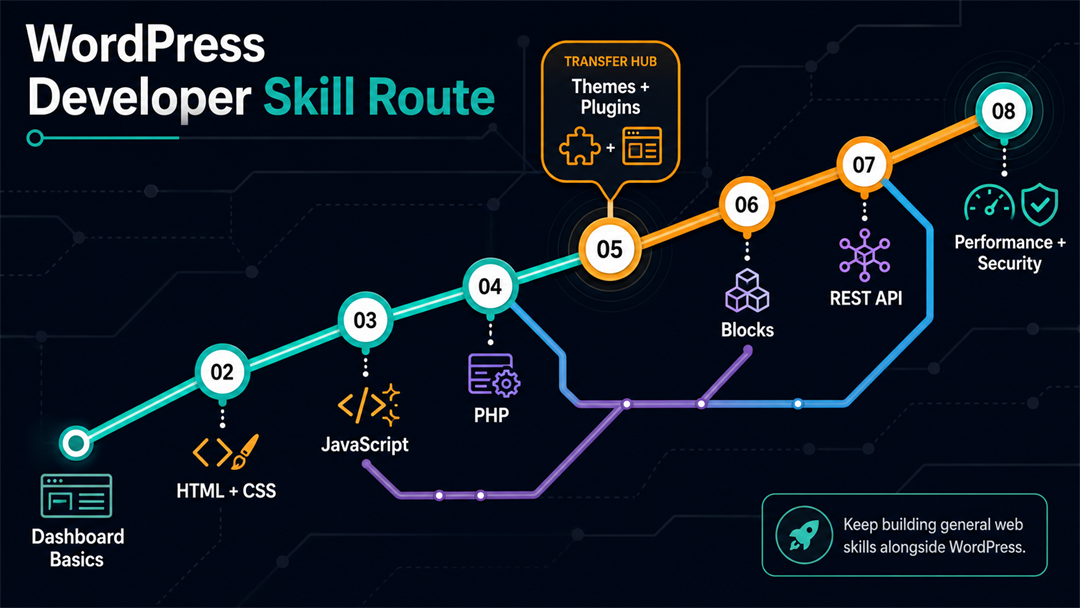
Here is a sensible order for learning WordPress development.
- Learn WordPress as a user. Create posts, pages, menus, forms, and simple layouts. Understand the dashboard before writing code.
- Build a local practice site. Use a local development tool or WordPress Playground so you can experiment without risking a live website.
- Learn HTML and CSS. You need structure and styling before theme work makes sense.
- Learn basic JavaScript. Start with DOM basics, events, and fetch requests, then move toward block-related concepts.
- Learn PHP fundamentals. Focus on the parts WordPress uses often: functions, arrays, templates, conditionals, and debugging.
- Study themes and template hierarchy. Build a small custom theme or child theme so you understand the front-end layer.
- Study plugins and hooks. Create a tiny plugin that adds a shortcode, registers a custom post type, or changes output through a filter.
- Learn block development. Build a simple custom block, then a dynamic block.
- Practice security and performance. Learn backups, staging, caching, image optimization, update testing, and safe plugin selection.
- Build portfolio projects. Create websites that reflect real situations, such as a local service business, a blog, a WooCommerce demo, or a custom content directory.
What Can You Do With WordPress Development Skills?
WordPress skills can support several paths.
Freelance Website Projects
Small businesses often need practical websites: home page, services, about page, contact form, blog, analytics, SEO basics, and an editable admin area. WordPress fits that pattern well.
Freelance opportunities are best when you can do more than just install a theme. Clients value your judgment in choosing the right structure, avoiding plugin overload, making the site fast, keeping it secure, and explaining your decisions clearly.
Agency or In-House Work
Agencies often maintain many WordPress sites because clients need marketing pages, landing pages, blogs, and content workflows. In-house marketing teams may also need developers who can support existing WordPress properties.
This is where maintenance, version control, staging, accessibility, and coding standards matter. WordPress provides official coding standards to help developers write code that is easier to read, review, and maintain.
WooCommerce and Ecommerce Support
WooCommerce can turn WordPress into an online store. That creates demand for setup, theme compatibility, checkout improvements, payment configuration, performance work, and ongoing maintenance.
Ecommerce projects come with more responsibility than simple brochure sites. If checkout fails, the business can lose sales. This is why having deeper WordPress skills is important.
Content, SEO, and Publishing Systems
WordPress is still strong for content-heavy websites. If you understand custom post types, taxonomies, templates, internal linking, structured content, and editorial workflows, you can help build sites that are easier to publish and maintain.
This is a real advantage. Many site owners do not need a flashy custom app. They need a simple publishing system their team can use easily.
How AI Changes the Value of WordPress Development
AI changes WordPress development, but it does not erase it.
AI tools can help by generating code snippets, drafting page copy, suggesting layouts, summarizing documentation, and speeding up repetitive tasks. However, they can also create broken, insecure, outdated, or context-blind code if no one reviews the results.
This means that valuable developers are not just those who write every line by hand, but those who know what needs to be built, how to check the work, and how to fix things when AI-generated answers are wrong.
For people learning WordPress, AI makes basic setup easier but also increases the value of real understanding.
The people most at risk are not skilled WordPress developers, but those who only know the basics and never learned how the platform really works.
Is WordPress Development Good for Beginners?
WordPress is a good option for beginners because you can see results quickly. You can build a real website even before you fully understand all aspects of web development.
That early progress is helpful. Starting with a blank programming course can feel abstract, but a WordPress practice site gives you something real to work on, like a page, menu, theme, plugin, form, or a problem to solve.
The trap is stopping too early.
If you only learn the dashboard, you become dependent on other people’s tools. If you keep going into code, server basics, blocks, performance, and security, WordPress becomes a useful bridge into professional web work.
Should You Learn WordPress.com or WordPress.org?
For development, focus on WordPress.org.
WordPress.com is a hosted service with its own plans and rules. It is a good way to start a simple site, but your development options depend on the plan you choose. WordPress.org is open-source software that you install on your own hosting or local setup.
If that distinction is still fuzzy, the comparison of WordPress.com vs WordPress.org is worth reading before you commit to a learning path.
For developers, WordPress.org is where you learn the skills that transfer to other projects, such as working with files, themes, plugins, databases, hosting, deployment, debugging, and site ownership.
A Simple Decision Framework
WordPress development is worth learning if at least two of these are true:
- You want to build websites for clients.
- You like content, SEO, publishing, or business websites.
- You want a practical freelance skill.
- You are comfortable learning some PHP.
- You want to customize existing sites, not only build new apps.
- You are interested in ecommerce through WooCommerce.
- You want to understand how a large open-source CMS works.
It is probably not your best main focus if most of these are true:
- You only want to build software products, not websites.
- You strongly dislike PHP and CMS architecture.
- You prefer fully managed no-code tools.
- You want a career path centered on modern app frameworks.
- You do not want to maintain websites after launch.
It is easy to overlook the last point: WordPress work often involves maintenance. Some people enjoy this because it builds long-term client relationships, while others find it tedious. Decide which group you belong to.
Final Verdict: Is WordPress Development Worth Learning?
WordPress development is worth learning in 2026 if you treat it as a real development skill. This means learning web fundamentals, PHP, JavaScript, themes, plugins, blocks, APIs, security, performance, and maintenance.
It is less valuable to learn WordPress if you only want to put together sites from themes without understanding how the system works. This approach is easier to replace, harder to defend, and less helpful when a project becomes complicated.
For freelancers, agency developers, small business site builders, content-focused developers, and WooCommerce specialists, WordPress remains a practical choice. For developers focused on apps, it is better as a supporting skill rather than your main focus.
The best approach is to learn WordPress well enough to solve real website problems while also building your general web development skills.
FAQs About Learning WordPress Development
Is WordPress development still in demand?
Yes, WordPress development is still in demand because many existing websites run on WordPress and need customization, maintenance, security, performance work, redesigns, and content support. Demand varies by market and skill level, so deeper technical ability is more valuable than basic dashboard familiarity.
Is WordPress outdated?
WordPress is not outdated, but parts of the ecosystem are older and uneven. Modern WordPress development includes the Block Editor, custom blocks, REST API integrations, current PHP versions, performance work, and accessibility. The outdated approach is relying only on bloated themes and plugin stacks without understanding the code.
Do I need to learn PHP for WordPress development?
Yes, you should learn PHP if you want to be a real WordPress developer. You can use WordPress without PHP, but custom themes, plugins, hooks, debugging, and server-side changes all require at least practical PHP knowledge.
Is WordPress development easier than coding from scratch?
WordPress can be easier for building common websites because it already includes content management, user roles, themes, plugins, media handling, and an admin dashboard. It is not a replacement for coding knowledge if you want to customize sites professionally.
Should I learn WordPress or React?
Learn WordPress if your goal is client websites, content sites, WooCommerce, or CMS work. Learn React if your goal is modern front-end applications and interactive product interfaces. If you want to build custom WordPress blocks or headless WordPress front ends, learning both can make sense.
Can I make money with WordPress development?
Yes, but not automatically. WordPress development can lead to freelance projects, maintenance retainers, agency roles, WooCommerce work, and custom site builds. Your income depends on your skill level, niche, sales ability, market, portfolio, and reliability.