
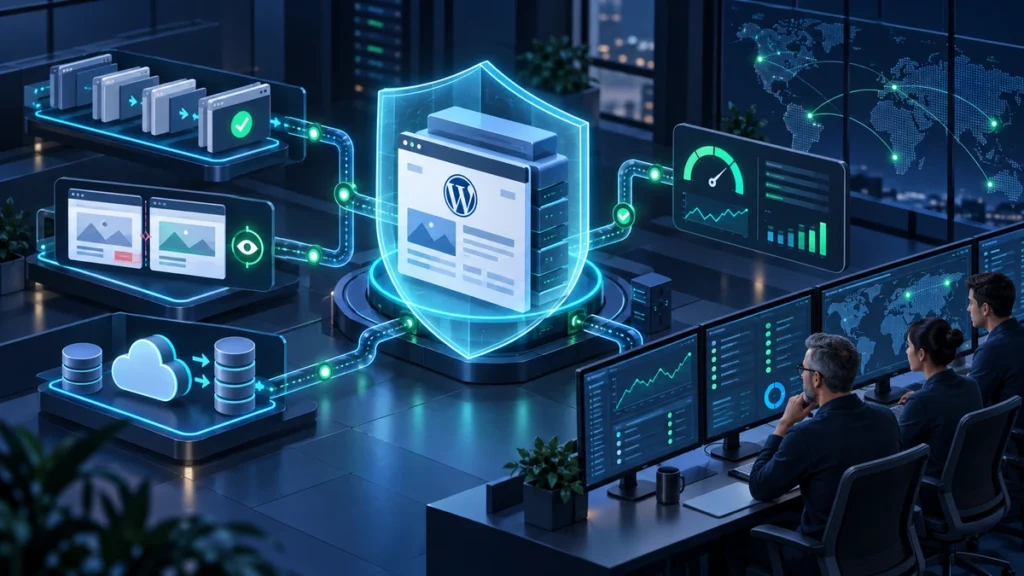
Outsource WordPress maintenance when your site generates leads, sales, or client trust and routine updates are taking time away from higher-value work. WordPress powers more than 43% of websites, but its PHP runtime, database, themes, plugins, and integrations need ongoing care to remain secure and reliable.
Quick Verdict: When and Why You Should Outsource WordPress Maintenance
Outsourcing WordPress maintenance involves delegating ongoing website operations, including staging-tested core and plugin updates, automated offsite backups, security scanning, performance tuning, and emergency troubleshooting, to a specialized external team. The four researched entry tiers range from $39 to about $107 per site monthly, while broader plans can cost more and reclaim 3 to 5 hours of operational work each month.
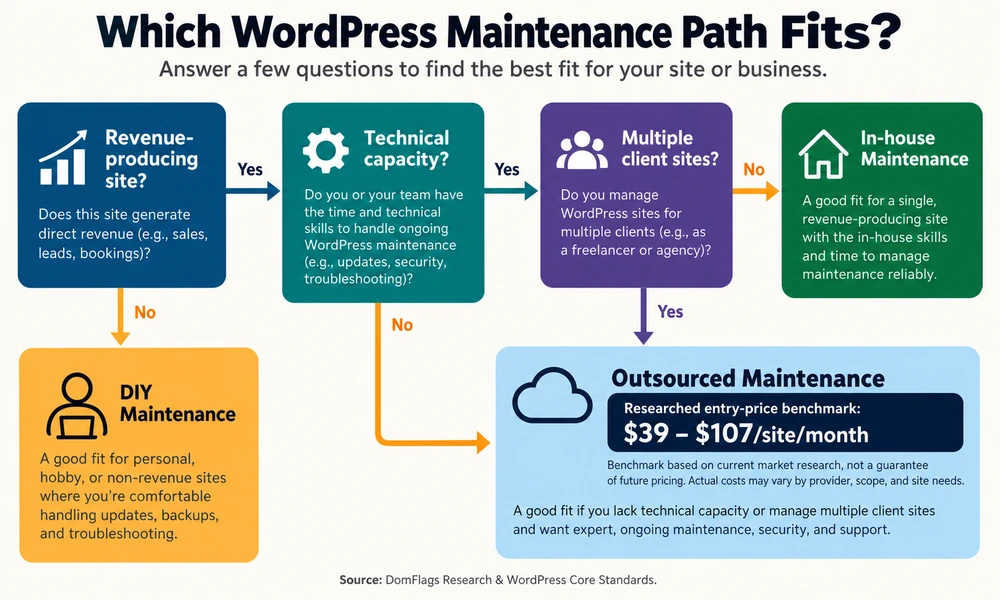
For a revenue-producing site, the practical decision is simple: outsource the operational work unless you run a hobby site with no meaningful downside from downtime or already have an under-utilized engineer who can own it safely. A professional WordPress maintenance service turns unpredictable repairs into a defined operating cost.
The baseline workload is usually 3–5 hours per site each month. That includes reviewing updates, testing plugin compatibility, checking backups, monitoring security, and resolving small defects. If a founder values their time at $150 per hour, four hours of DIY work represents $600 in opportunity cost before a single emergency occurs.
The risk is also asymmetric. A small business outage has been estimated at about $427 per hour when lost transactions, wasted advertising, and brand damage are combined. A serious infection or corrupted site can require $5,000–$15,000 in emergency remediation. A care plan starting around $39 monthly does not eliminate every risk, but it buys a tested process, faster detection, and a clear escalation path.
- Choose DIY when the site is non-commercial, simple, and you can test and restore it confidently.
- Choose an in-house developer when you have a sustained backlog of proprietary development, not merely recurring updates.
- Choose an outsourced retainer when reliability matters but a full-time technical hire would be underused.
- Choose white-label support when an agency has several client sites and senior staff are absorbing non-billable maintenance.
The strongest decision rule is operational: if a failure would interrupt revenue, and nobody has protected time to test and restore the site, outsource the responsibility. Review the WordPress project documentation for the platform baseline, then ask providers to show how their process adds application-level assurance around it.
The Core Decision Framework for Business Owners
Start with the cost of failure, not the monthly invoice. If the website captures leads, accepts payments, supports bookings, or acts as a trust signal, plugin conflicts and missed updates have a business consequence. Four hours spent fixing a form at a $150 internal billing rate costs $600 in displaced work; a $79 plan is therefore an operating hedge, not just a convenience purchase.
DIY remains reasonable for a low-stakes brochure site when the owner has a tested backup, a staging workflow, and time reserved every month. It becomes poor value when maintenance happens reactively, the site runs WooCommerce, or nobody knows how to recover from a white screen of death. Use the same test for an internal marketing team: if a campaign launch depends on the site, technical reliability deserves an explicit owner.
The Capacity Calculus for Growing Digital Agencies
An agency with 25 client sites can spend 75–125 hours monthly on maintenance if each site consumes 3–5 hours. That is close to a full-time role, yet the work arrives as interruptions: a form stops sending, a theme update changes a layout, or a client needs a small CSS fix during a proposal deadline.
White-label capacity lets the agency protect billable strategy, design, and development time. The agency keeps the client relationship while a partner handles the technical queue, documents the work, and returns branded reports. The result is less client churn from neglected sites and more predictable recurring revenue.
The Hosting Maintenance Fallacy: Why Your Web Host Does Not Maintain Your Website
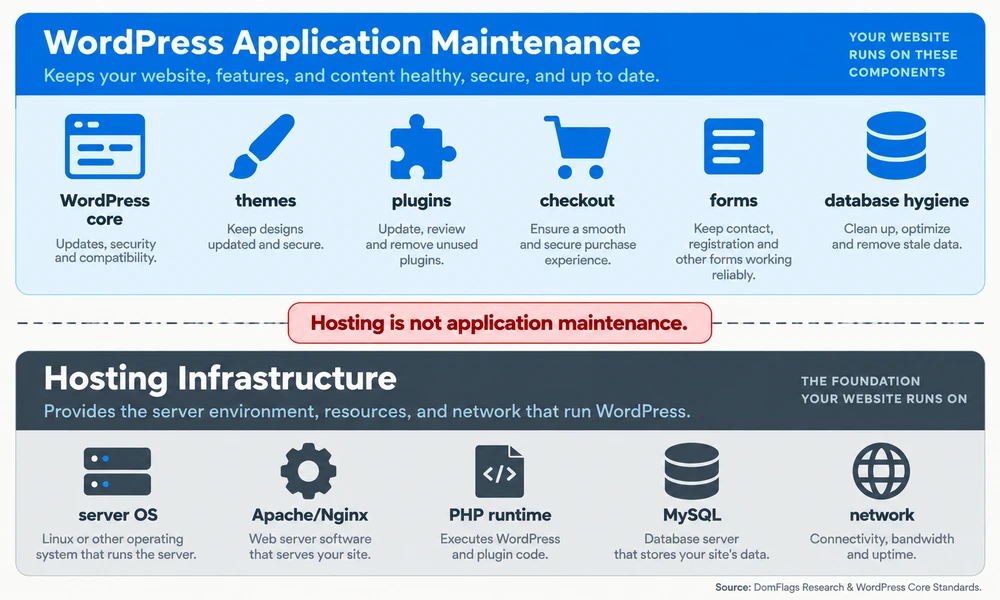
Managed hosting is valuable, but it is not application maintenance. Providers such as WP Engine, Kinsta, and SiteGround optimize infrastructure, networking, server configuration, and PHP availability. They generally do not promise to debug every third-party plugin, preserve custom theme styling, test a checkout, or repair application code.
The distinction matters because most WordPress vulnerabilities occur in plugins and themes rather than core. Patchstack’s security research places that share above 96%, with less than 2% originating in WordPress core. Paying for a well-managed server does not remove the need to maintain the software running on it.
The Architectural Divide Between Server Infrastructure and Application Code
| Layer | Typical host responsibility | Application-maintenance responsibility |
|---|---|---|
| Server | Hardware, networking, Apache/Nginx availability, PHP runtime, server firewall | Confirm that the application remains compatible after runtime changes |
| Database | MySQL service availability and snapshots offered by the host | Clean revisions, transients, autoloaded options, and verify restores |
| WordPress core | Sometimes platform-level compatibility guidance | Test and deploy core updates safely |
| Themes and plugins | Usually outside support scope | Review vulnerabilities, update on staging, test integrations and custom code |
| Customer journeys | HTTP uptime monitoring | Validate forms, logins, WooCommerce checkout, analytics, and visual layout |
The host keeps the execution environment available. The maintenance team owns the application layer: themes, plugins, custom code, content templates, database hygiene, and the user journeys that produce revenue. Read the host’s support terms carefully; even a premium plan may explicitly exclude application debugging.
The Silent Breakage Trap: Why Native WordPress Auto-Updates Fail Live Sites
Background updates are useful for some low-risk patches, but an unattended update can create a silent failure. A plugin may deploy overnight, conflict with a theme or PHP version, and break a checkout or contact form while the server continues returning HTTP 200. An uptime monitor sees a page; customers see a broken journey.
That is why a mature provider uses staging environment updates, visual regression testing, and rollback snapshots. The goal is not to avoid every update. It is to make the update observable, testable, and reversible before it reaches production.
What Outsourced WordPress Maintenance Actually Covers
Professional maintenance is proactive operations, not a monthly click on the Update button. A useful retainer combines software lifecycle management, security, recovery, performance, and a support desk. Confirm the boundary between maintenance and development because new features, redesigns, and complex integrations often require separate hours.
Core, Theme, and Plugin Management with Visual Regression Testing
The safest sequence is: clone production to staging; capture pre-update screenshots; apply core, theme, and plugin updates; run post-update comparisons with Playwright or BackstopJS; validate forms and checkout; then deploy with a rollback snapshot ready. This catches a broken menu, shifted template, or WooCommerce issue that a simple HTTP check misses.
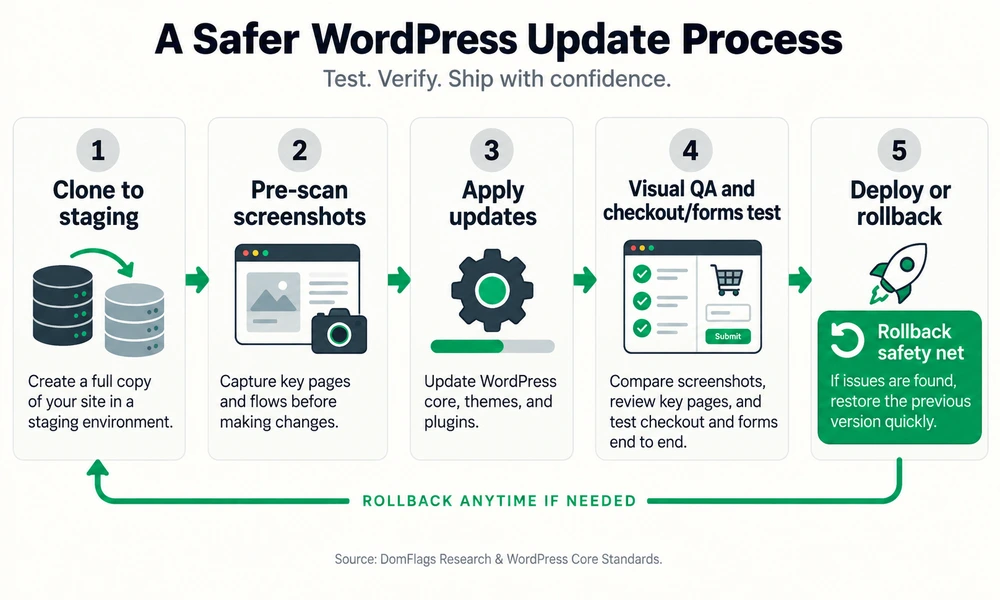
Link this operational standard to the safe WordPress update checklist when readers need a hands-on reference. Providers should also document which plugins are excluded, how conflicts are quarantined, and whether emergency fixes consume monthly development time.
Proactive Security Hardening, Vulnerability Patching, and Malware Remediation
Security coverage should include vulnerability monitoring, timely patching, firewall rules, brute-force protection, two-factor authentication, file integrity checks, and review of administrator accounts. Some teams disable XML-RPC when the site does not need it, limit login attempts, and audit file permissions.
Ask whether the plan includes a malware removal and cleanup guarantee or merely an alert. A useful service explains what happens after detection, who performs the cleanup, how credentials are rotated, and whether the provider restores a known-clean backup. A WordPress security checklist can help you compare the provider’s stated scope with your own requirements.
Redundant Offsite Backups and Disaster Recovery Verification
A backup stored only on the same host is not a complete recovery plan. If the server or account is compromised, the backup may be altered or disappear with the site. Require encrypted, automated offsite cloud backups, such as an AWS S3 or Wasabi destination, with separate retention rules for the database and files.
The important word is verified. A provider should periodically restore a copy into a sandbox, confirm that the database, media, and configuration work together, and record the recovery time. Use the WordPress backup guide to check whether the proposed process covers both files and database content.
Speed Optimization, Database Hygiene, and Core Web Vitals Maintenance
Performance degrades as revisions, expired transients, oversized images, and autoloaded options accumulate. Maintenance may include database cleanup, object caching with Redis or Memcached, WebP image compression, cache validation, and removal of unused extensions.
The provider should watch Core Web Vitals, including LCP, INP, and CLS, and explain what is measured before and after work. These metrics do not replace real-user feedback, but they provide a useful signal when a plugin, script, or template change harms experience. For a deeper diagnostic path, connect to the Core Web Vitals WordPress guide.
Emergency Triage, Bug Fixes, and Dedicated Development Support
Many plans include 30–60 minutes of small monthly changes: text edits, CSS adjustments, or a simple compatibility fix. Ask what happens when the request is larger. A maintenance plan should state the SLA response time for a critical outage, the escalation route, and whether emergency work is billed separately.
The best support desk combines monitoring with human triage. It can identify whether a failure comes from hosting, a plugin, a recent deployment, or compromised files, then restore service while preserving evidence for a permanent fix. If the issue is a common WordPress error, the WordPress errors guide can help your team describe symptoms precisely.
The Financial Mathematics: DIY vs. In-House Hire vs. Outsourced Specialist
| Model | Direct cash cost | Time and risk profile | Best fit |
|---|---|---|---|
| DIY or internal staff | Often no new invoice; roughly 3–5 hours/site/month | $150/hour opportunity cost can reach $600/month per site; recovery risk remains | Low-stakes sites and teams with tested skills |
| Full-time in-house developer | $75,000–$88,000 base; $95,000–$115,000 fully burdened | About $7,917–$9,583/month before utilization; strong control, expensive idle capacity | Proprietary product work and large estates |
| Outsourced specialist | Researched entry tiers: $39–$107/site/month; broader plans can reach $250+ | Defined process, SLA, shared expertise, provider dependency | Most commercial sites and agency rosters |
The figures are benchmarks, not guarantees. Compare billing periods and scope carefully: a $79 monthly care plan is not equivalent to a one-time development project, and a $2,000 monthly retainer may include a dedicated engineer rather than routine updates alone. For context, W3Techs’ WordPress usage statistics show why the ecosystem’s scale matters, while Glassdoor’s WordPress developer salary benchmark provides a reference point for labor costs. Treat both as benchmarks that should be refreshed before a final budget decision.
The Hidden Opportunity Cost of DIY Maintenance
Suppose a founder maintains one site for four hours each month and could otherwise sell or deliver work at $150 per hour. The apparent $0 maintenance invoice hides $600 of monthly opportunity cost. Even at $39 per month, outsourcing can be financially positive if it returns those hours to revenue-producing work.
The calculation changes for a hobby site or a team member with genuinely spare capacity. The point is to price the time honestly, include interruptions, and include the expected cost of a failed update. “Free” is only accurate when the work has no displaced value.
The In-House Developer Trap: Salary, Overhead, and Utilization Realities
An $80,000 base salary can become approximately $100,000 after benefits, payroll taxes, software, equipment, recruiting, and management overhead. That is about $8,333 per month. An employee can deliver much more than maintenance, which is precisely why hiring one solely for routine care is often inefficient.
An in-house developer makes sense when the business has a sustained backlog of proprietary features, integrations, or internal systems. The report’s decision rule is roughly 30+ hours of weekly custom development or a large enough site estate to keep the role highly utilized. Otherwise, specialist retainers spread expertise across clients.
The Cost of Neglect: Outage Costs, Malware Triage, and Emergency Recoveries
The downside is not just a missed update. Small-business downtime has been estimated at $427 per hour, while severe hacked-site recovery can range from $5,000 to $15,000. These are benchmark estimates and the actual loss depends on traffic, conversion rate, margins, and response speed.
Use a simple expected-cost test: annual maintenance fees plus the value of internal time should be compared with the probability-weighted cost of outages, cleanup, and lost campaigns. A hacked WordPress recovery guide explains why prevention and clean restore points matter.
Outsourced Pricing Tiers: From Budget Care to Enterprise Retainers
| Tier | Typical monthly range | Usually includes | Questions to ask |
|---|---|---|---|
| Basic | $39–$107/site | Updates, backups, monitoring, basic support | Is staging included? What is excluded? |
| Mid-tier | $149–$249/site | Staging, visual checks, security, performance, small edits | Is WooCommerce and custom code supported? |
| Enterprise | $500–$2,000+/site | Dedicated engineering, priority response, complex environments | What SLA, reporting, and recovery guarantee is binding? |
Agency White-Label Outsourcing: Scaling Client Rosters Without Expanding Overhead
The Agency Bottleneck: Why Post-Launch Support Derails Billable Production
Maintenance interrupts the work agencies are paid to do. A senior developer who spends an afternoon resolving a client plugin conflict is not designing a campaign, building a feature, or improving conversion. Across 25 sites, even a modest 3–5 hours per site becomes 75–125 hours monthly.
White-Label Margin Economics: Transforming a Cost Center into Recurring Revenue
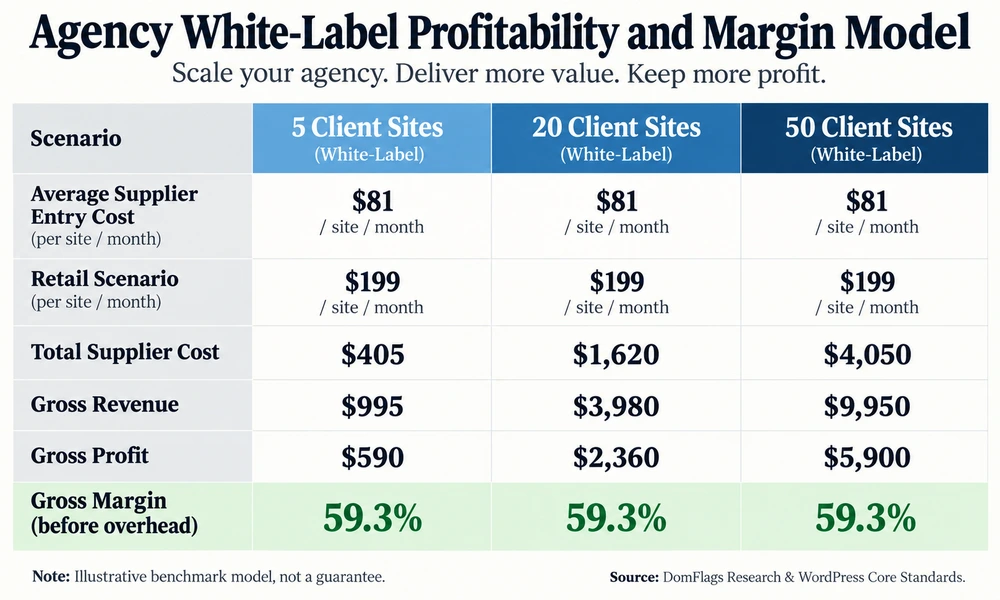
| Client roster | Average supplier cost at $81/site | Retail scenario at $199/site | Gross revenue | Gross margin before overhead |
|---|---|---|---|---|
| 5 sites | $405/mo | $995/mo | $590/mo | 59.3% |
| 20 sites | $1,620/mo | $3,980/mo | $2,360/mo | 59.3% |
| 50 sites | $4,050/mo | $9,950/mo | $5,900/mo | 59.3% |
This is an illustrative model, not a market guarantee. A fresh comparison of four non-competing supplier offers found published entry prices of $39, $79, $99, and approximately $107 per site monthly. The $107 figure converts a published GBP price using a 1.35275 USD-per-GBP mid-market rate on September 12, 2026. The average of the four entry prices is $80.97, rounded to $81. The $199 retail price is a scenario assumption, not a supplier quote.
Across all four published entry tiers, the common minimum is a baseline WordPress care service: keeping WordPress core, themes, and plugins maintained; providing some form of backup or hosting protection; applying security monitoring, scanning, or firewall controls; and giving the buyer a support or reporting channel. Staged updates, malware cleanup, performance optimization, content edits, white-label reports, and emergency response are not common to every lowest-priced tier, so they should be treated as plan-specific inclusions rather than assumed benefits.
| Supplier entry-price basis | Price converted to USD | Common minimum coverage publicly stated |
|---|---|---|
| Supplier A | $39/site/month | Core, theme, and plugin updates; monitoring/security scans; daily off-site backups |
| Supplier B | $79/site/month | Updates; daily off-site backups and restore assistance; security/malware monitoring; white-label reporting |
| Supplier C | $99/site/month | Managed hosting; security and firewall protection; content edits; ticket tracking and reporting |
| Supplier D | $107/site/month | Staged updates; daily off-site backups; uptime and security monitoring; SSL and Core Web Vitals checks; one hour of edits |
Contractual Safety: Non-Poaching Agreements, NDAs, and Brand Shielding
White-label WordPress maintenance works only when the relationship protects the agency. Require an NDA, written non-poaching language, ownership of client data and backups, branded reporting, defined escalation, and a clear rule for direct client contact. Keep the agency as the accountable relationship owner.
How to Vet and Select a WordPress Maintenance Partner
Non-Negotiable Must-Haves: The Enterprise Technical Checklist
| Requirement | Evidence to request | Why it matters |
|---|---|---|
| Staging-first updates | Sample workflow and rollback record | Prevents blind production changes |
| Offsite backups | Destination, retention, and restore test | Makes recovery credible |
| Security response | Patch feed, WAF, cleanup terms | Converts alerts into action |
| Monitoring and QA | Form, checkout, and visual checks | Detects silent breakage |
| SLA and reporting | Response targets and sample report | Makes service measurable |
Ask for a sample monthly report, not just a feature list. It should show completed updates, vulnerabilities reviewed, backup status, performance observations, open risks, and time used. The provider should explain how it handles WooCommerce, custom plugins, PHP upgrades, and a site that cannot be safely updated.
Critical Red Flags: Signs of Amateur and Risky Maintenance Services
Be cautious when a provider updates directly on production by default, stores backups only on the host, offers vague “24/7 support,” cannot explain rollback, or requests a shared root password. A very low price can be appropriate for a narrow scope, but it should not be mistaken for full application reliability.
Other red flags include no named escalation path, no activity logs, no malware-cleanup terms, unlimited promises with no fair-use boundary, and a contract that lets the provider contact clients without permission.
Contractual Due Diligence: SLAs, Termination Terms, and Data Ownership
The agreement should define response versus resolution time, severity levels, maintenance windows, included hours, overage rates, cancellation terms, credential revocation, backup export, and ownership of code and data. A response-time promise of 15 minutes is not the same as a fix in 15 minutes.
Step-by-Step Transition Protocol: How to Onboard an Outsourced Maintenance Team
Phase 1: Technical Debt Audit and Infrastructure Inventory
Record the host, PHP version, WordPress version, theme, plugins, custom code, domains, DNS, cron jobs, analytics, forms, payment flows, and current backups. Identify abandoned plugins, known vulnerabilities, and any part of the site that nobody can safely change.
Phase 2: Secure Access Delegation Using Least-Privilege Principles
Create a named provider account rather than sharing a personal administrator login. Use an encrypted vault such as 1Password or Bitwarden, grant only the access required, and keep hosting, DNS, and registrar credentials separate. Log actions and plan how access will be revoked.
Phase 3: Staging Verification, Full Backup Snapshot, and Monitoring Setup
Take a full files-and-database snapshot, restore it into staging, and confirm that forms, checkout, email, and analytics work. Establish uptime and performance monitoring, define alert recipients, and test rollback before the first production update.
Phase 4: Communication Channel Integration and 30-Day Pilot Evaluation
Agree on tickets, emergency channels, approval rules, maintenance windows, and report format. Run a 30-day pilot with explicit success criteria: updates completed safely, backups verified, issues resolved within SLA, and no unexplained client contact. At the end, keep the relationship, adjust scope, or revoke access with a documented handoff.
Frequently Asked Questions About Outsourcing WordPress Maintenance
How much does outsourcing WordPress maintenance typically cost?
Basic plans in the researched set cost $39–$107 per site monthly. Mid-tier care plans with staging, security, performance work, and small edits commonly cost $149–$249 monthly. Enterprise retainers with priority support or dedicated development often range from $500 to $2,000 or more monthly, depending on risk and scope.
Will my agency clients know I am outsourcing their website maintenance?
Not necessarily. A genuine white-label partner can issue reports and support communication under the agency’s brand. Put confidentiality, non-poaching, client-contact rules, and ownership of records in writing rather than relying on an informal promise.
Can I outsource maintenance if my website has custom code and complex plugins?
Yes, but choose a plan that explicitly supports custom code, WooCommerce, staging, visual regression testing, and dedicated developer hours. Budget plans usually cover standard plugins and themes; complex architecture needs deeper review and a clearly priced engineering path.
How do maintenance companies handle plugin updates that break website functionality?
They should update a staging clone first, compare pre- and post-update behavior, test forms and checkout, quarantine conflicts, and deploy only after approval. If production still fails, rollback snapshots and an incident-response SLA should restore service quickly while the root cause is investigated.
Is it secure to grant an external maintenance provider administrative access?
Yes, when access follows least privilege. Use a dedicated named account, an encrypted vault, strong authentication, activity logs, and separate hosting credentials. Never send a shared root password through email or chat, and review access whenever the contract or team changes.
Can I bring my WordPress maintenance back in-house if my needs change?
Usually. Prefer a month-to-month or clearly terminable agreement, retain ownership of the site and backup archives, export documentation, and revoke accounts at handoff. A provider should make exit practical rather than locking the business into undocumented systems.
The broader WordPress development guide explains where maintenance ends and custom development begins. For platform-level cost context, readers can also use the planned Squarespace vs. WordPress comparison. For a technical baseline, review WooCommerce documentation when the site processes transactions, Patchstack’s WordPress security research for vulnerability context, and WP Engine’s legal and support terms when comparing hosting scope with application care.